
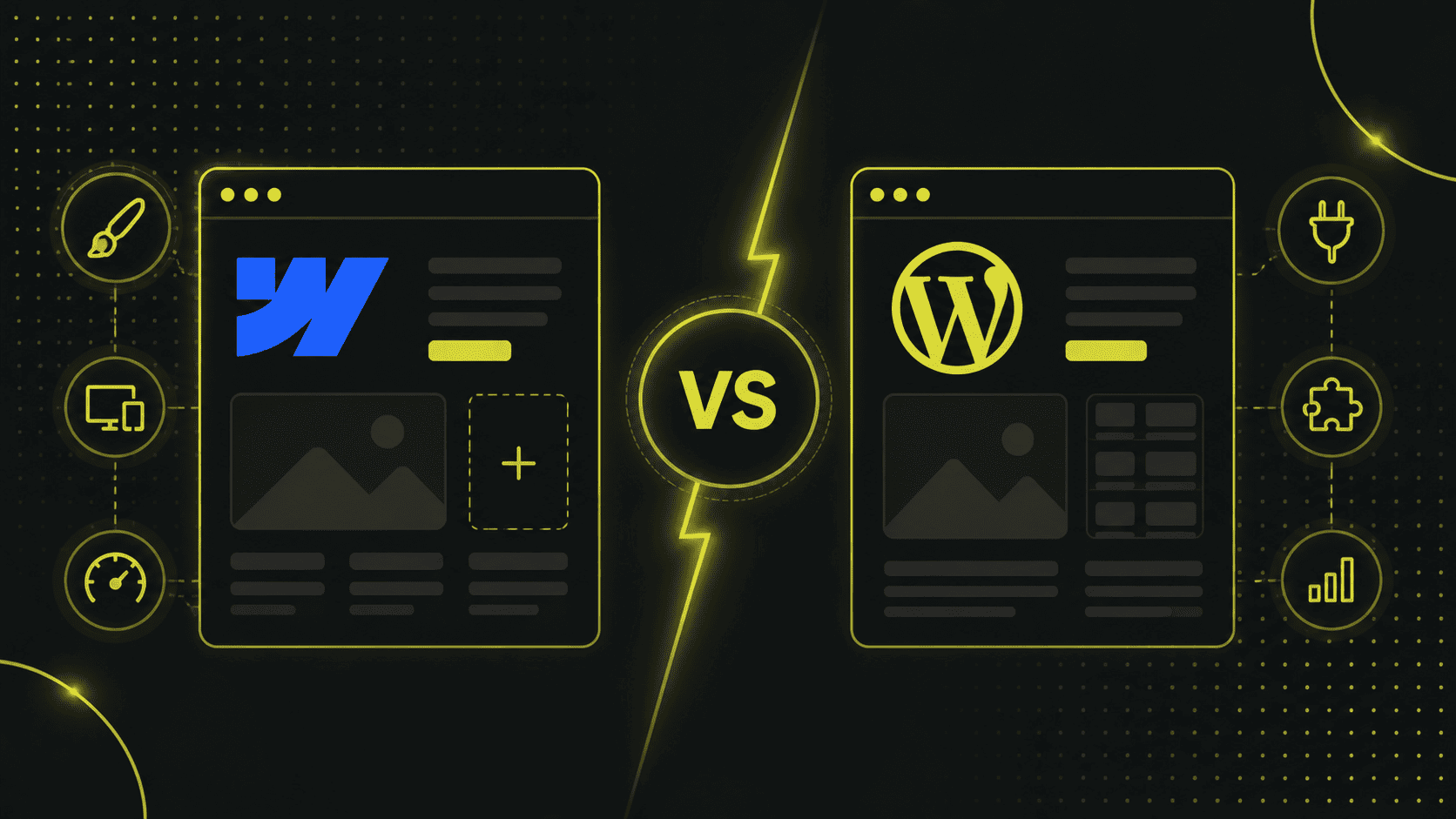
Webflow und WordPress sind zwei der beliebtesten Plattformen für die Erstellung von Websites.
Beide Content Management Systeme (CMS) haben ihre eigenen Stärken und Schwächen, und die Wahl der richtigen Plattform hängt stark von den individuellen Bedürfnissen und Zielen des Nutzers ab.
Während Webflow besonders für Designer und Kreative geeignet ist, die eine visuell ansprechende und individuelle Website erstellen möchten, bietet WordPress eine enorme Flexibilität und Erweiterbarkeit durch eine Vielzahl von Plugins und Themes.
Gerade weil sich Website-Baukästen und CMS in den letzten Jahren stark weiterentwickelt haben, stellt sich auch bei vielen Projekten die Frage, ob WordPress noch zeitgemäss ist.
In diesem Artikel vergleichen wir deshalb die beiden Plattformen detailliert und zeigen die Vor- und Nachteile von Webflow und WordPress auf, um dir bei der Wahl der besten Plattform für dein Website Projekt zu helfen.
Der Wechsel von WordPress zu Webflow: Wir haben den Wechsel gewagt
Nachdem wir die Website unserer Webagentur (Beyondweb GmbH) seit 2017 auf WordPress betrieben hatten, entschieden wir uns nach sechs Jahren, das neue Design mit Webflow umzusetzen.
Die Hauptgründe für diesen Wechsel waren der Wunsch nach weniger Wartungsaufwand und einer besseren Performance.
WordPress bietet als Open-Source-Software zwar grosse Flexibilität und Anpassungsmöglichkeiten, erfordert jedoch auch mehr Eigenverantwortung bei der Wartung und Sicherheit.
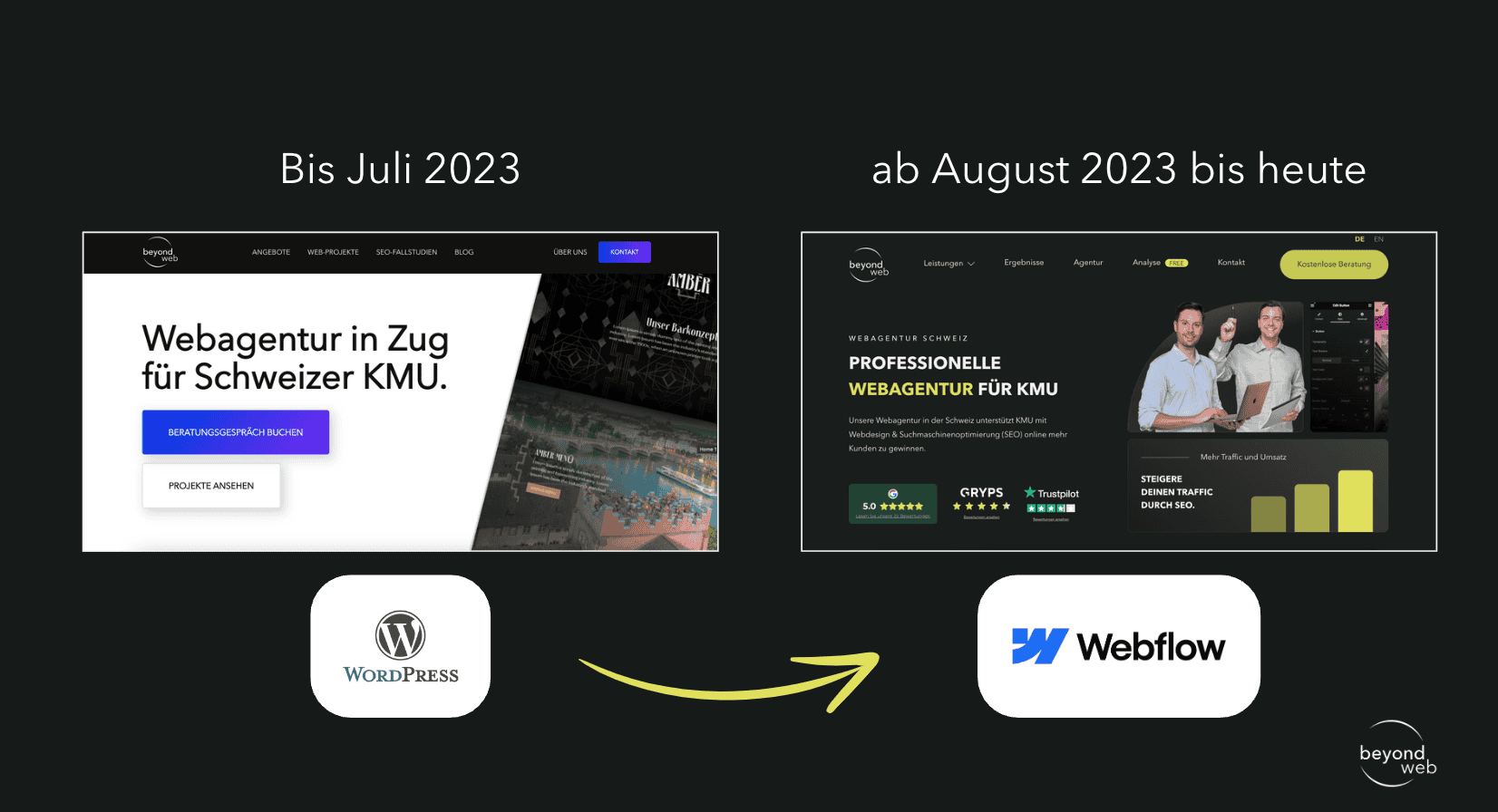
Unsere WordPress-Seite lief mit einem CDN von Amazon Web Services, was zwar die Ladezeiten verbesserte, die Wartung und das Staging blieben weiterhin aufwendig.
Deshalb entschieden wir uns für Webflow, um weniger Wartungsaufwand zu haben.
Auch wichtig zu erwähnen: Zu diesem Zeitpunkt verwendeten wir ein Shared Hosting bei Infomaniak.
Aktuell verwenden wir für alle unsere WordPress-Kunden ein Managed WordPress Hosting von Kinsta.
Auf diesen Aspekt werde ich später noch näher eingehen.
Wenn du die Methodik und die Erklärung der Bewertungskriterien überspringen möchtest, dann klicke hier.
Methodik & Bewertungssystem
Unsere Bewertung der beiden Systeme Webflow und WordPress basiert auf einer Reihe von Kriterien, welche man bei der Wahl eines CMS aus unserer Sicht auf jeden Fall beachten sollte.
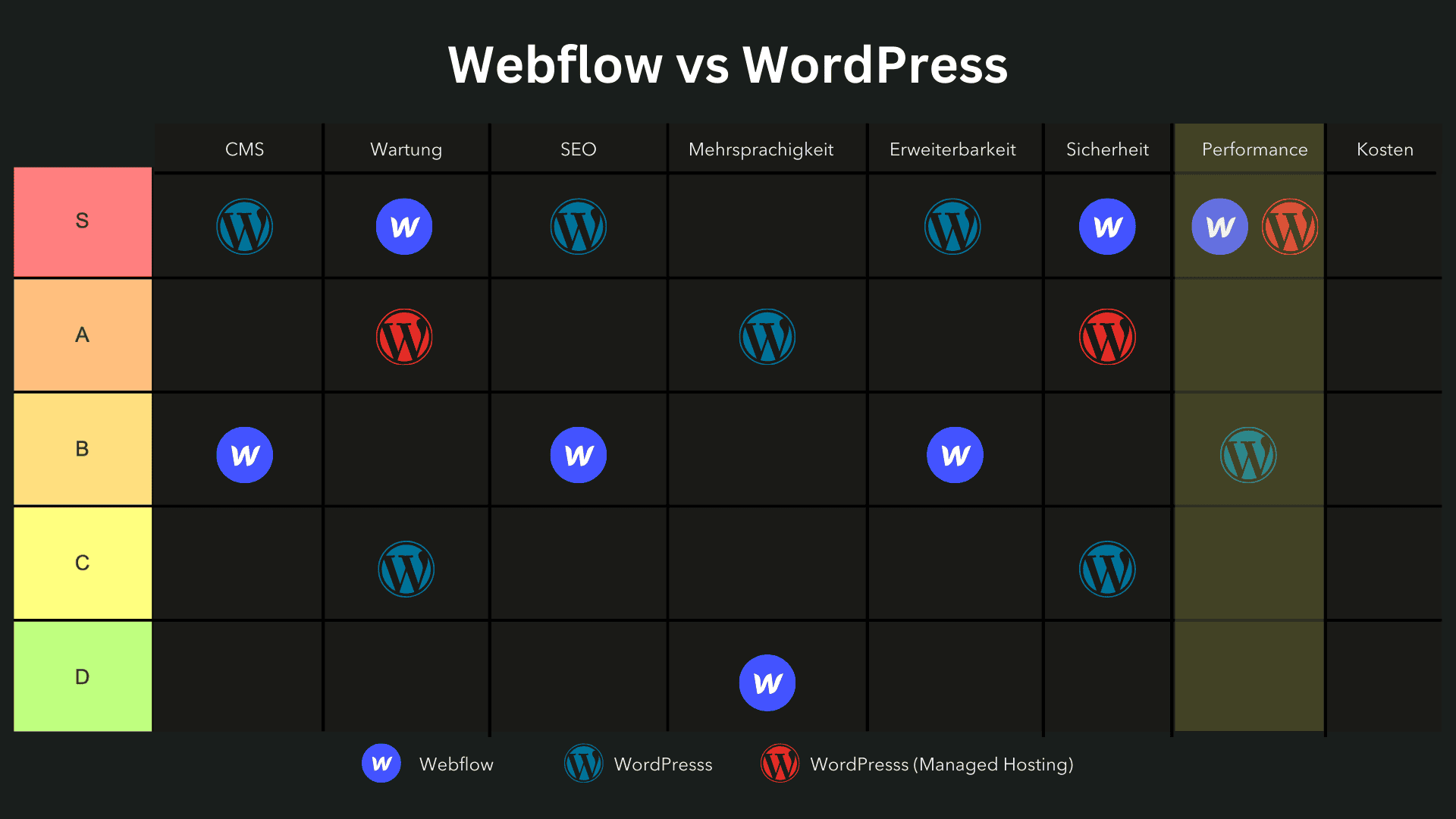
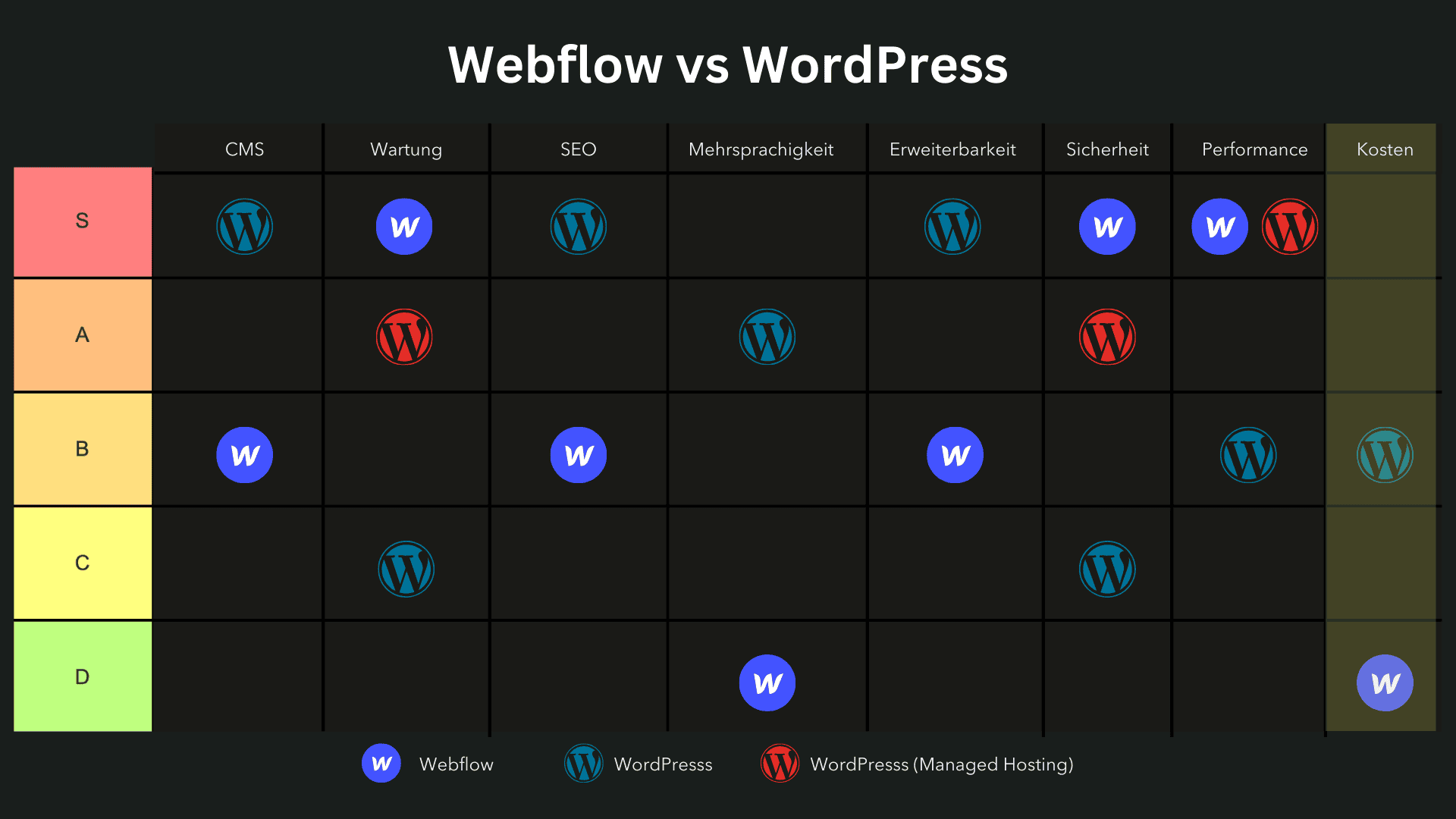
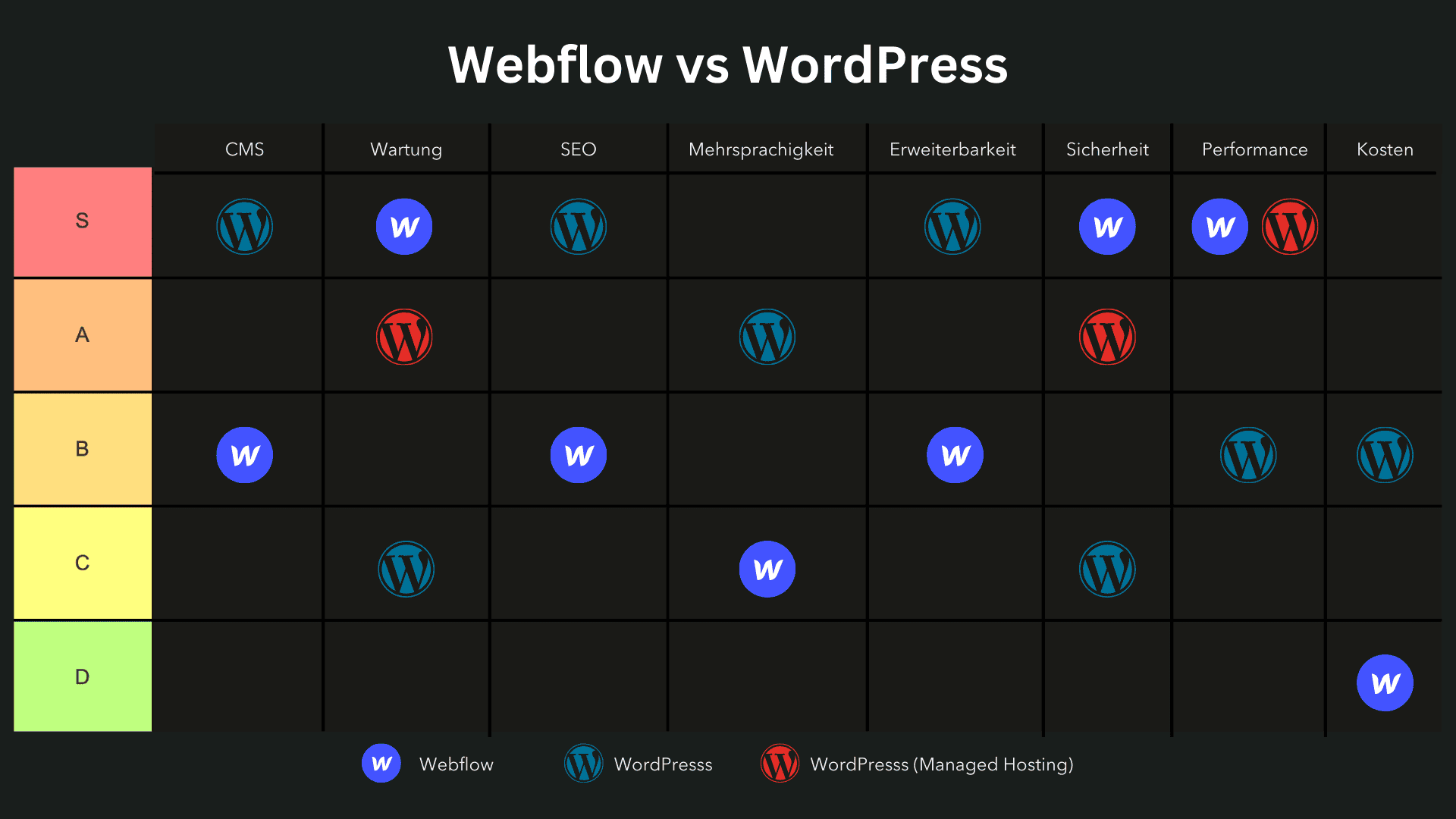
Die Kategorien werden in einem Tier-System dargestellt, um die Leistung der beiden Plattformen klar zu visualisieren:
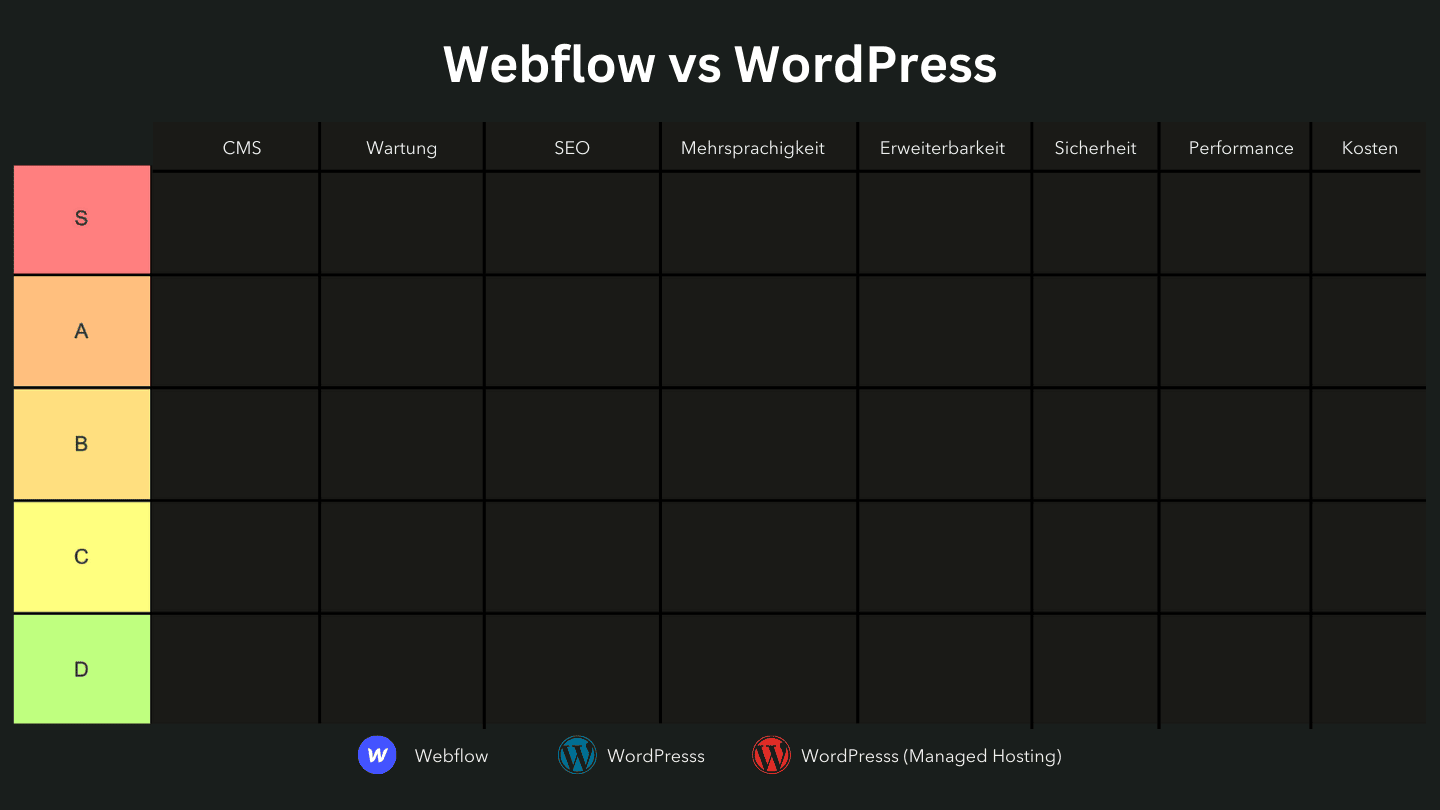
Bewertungssystem
- S-Tier: Die Plattform erfüllt alle Anforderungen ausgezeichnet und bietet aussergewöhnliche Vorteile.
- A-Tier: Die Plattform bietet grossartige Funktionen mit wenigen Einschränkungen.
- B-Tier: Eine solide Wahl mit guten Funktionen, aber einigen Schwächen.
- C-Tier: Erfüllt einige Grundanforderungen, weist jedoch signifikante Mängel auf.
- D-Tier: Erfüllt die meisten Anforderungen nicht und eignet sich nur für sehr grundlegende Projekte.
Kriterien für die Bewertung:
- Content-Management (CMS): Bewertet die Benutzerfreundlichkeit und Flexibilität der Plattformen bei der Verwaltung und Organisation von Inhalten.
- Design und Anpassungsmöglichkeiten: Analysiert, wie gut sich die Plattformen an individuelle Designwünsche anpassen lassen und welche kreativen Freiheiten sie bieten.
- Erweiterbarkeit: Untersucht die Verfügbarkeit und Qualität von Plugins und Erweiterungen, um zusätzliche Funktionen und Integrationen hinzuzufügen.
- SEO: Bewertet die integrierten Funktionen und Anpassungsoptionen für Suchmaschinenoptimierung zur Verbesserung der Sichtbarkeit.
- Mehrsprachigkeit: Analysiert die Eignung der Plattformen zur Unterstützung und Verwaltung mehrsprachiger Websites.
- Wartung und Updates: Bewertet den Aufwand für die Pflege und Aktualisierung der Plattformen, einschliesslich der Häufigkeit und Einfachheit von Updates.
- Performance: Misst die Ladegeschwindigkeit und technische Effizienz der Plattformen, insbesondere bei steigender Besucherzahl und Content-Menge.
- Sicherheit: Untersucht die eingebauten Sicherheitsfunktionen und die Anfälligkeit gegenüber potenziellen Sicherheitsbedrohungen.
- Kosten: Vergleicht die Preisstruktur und die langfristigen Kosten, die für die Nutzung und Skalierung der Plattformen anfallen.
Tipp: Beide Plattformen haben eine Lernkurve, insbesondere wenn man als Anfänger eine Website selbst erstellen möchte.
Alle diese Kriterien werden bewertet und in die entsprechenden Tier-Kategorien eingeordnet. Diese Einteilung ermöglicht es, die Stärken und Schwächen von Webflow und WordPress klar zu visualisieren und zu verstehen, welche Plattform für welche Art von Projekten am besten geeignet ist.
Webflow: Ein Überblick
Webflow ist eine All-in-One-Plattform, die Design- und Entwicklungstools in einem visuellen Editor vereint und insbesondere in der Webdesign-Community in den letzten Jahren stark an Beliebtheit gewonnen hat.
Neben Webflow wird in der Praxis auch Wix oft als Baukasten-Alternative diskutiert, besonders wenn es um einfache Websites mit möglichst wenig Wartungsaufwand geht.
WordPress: Ein Überblick
WordPress ist das weltweit am weitesten verbreitete CMS (mit 43.7% Marktanteil) und bietet eine Vielzahl an Themes und Plugins, die für nahezu jedes Projekt angepasst werden können.
Aufgrund seiner langen Marktreife und riesigen Community ist es äusserst beliebt und flexibel.
Für professionelle Webprojekte hängt die Qualität bei WordPress am Ende weniger am CMS selbst als an Setup, Hosting und sauberer Umsetzung.
Webflow vs. WordPress: Der direkte Vergleich
Hier sind die beiden Plattformen im Detail anhand der oben genannten Bewertungskriterien miteinander verglichen.
Content Management in Webflow und WordPress
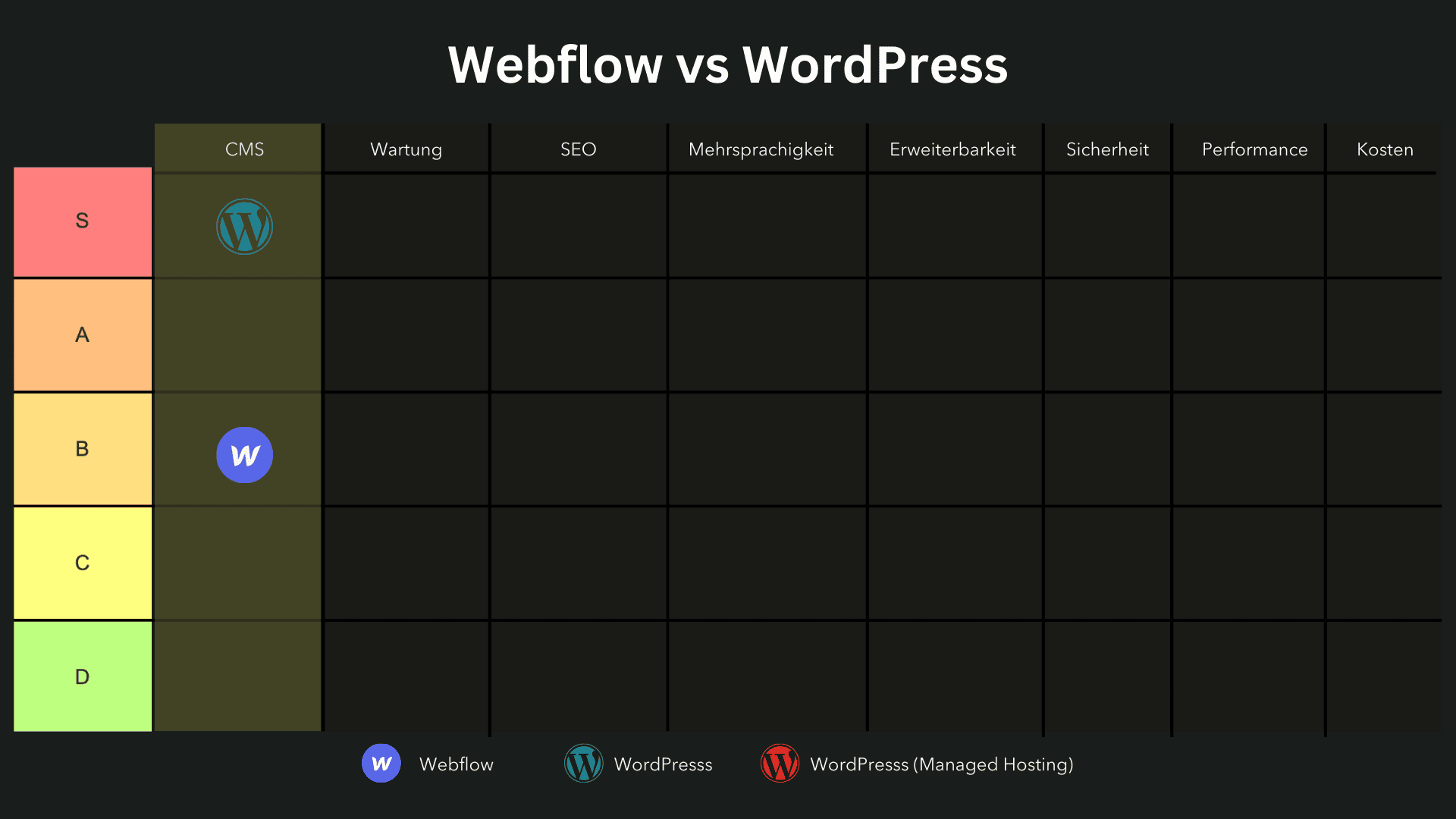
Beide Plattformen eignen sich als Content-Management-Systeme, aber WordPress bietet hier mehr nativen Funktionsumfang.
Während man in WordPress Kategorien, Tags und weitere Content-Management-Funktionen sofort zur Verfügung hat, muss in Webflow vieles individuell angepasst werden.
Funktionen wie das Hinzufügen von Kategorien oder Tags erfordern in Webflow zusätzliche Arbeit und oft benutzerdefinierte Programmierung, was den Arbeitsaufwand erhöht.
Als Website-Builder ermöglichen beide Plattformen jedoch auch Benutzern ohne Programmierkenntnisse, visuell ansprechende Webseiten zu erstellen und bieten integrierte Lösungen für Webdesign und Hosting.
Ein weiteres Limit bei Webflow zeigt sich bei umfangreichen Content-Projekten.
Die Performance kann langsamer werden, wenn die Inhalte zunehmen, was das Content-Management erschwert.
Zudem sind die Möglichkeiten zur Sortierung und Verwaltung von Inhalten begrenzt.
Während WordPress hierfür Plugins und native Optionen bietet, fehlen in Webflow einige dieser Basisfunktionen – etwa für das Einfügen von Tabellen oder für die erweiterte Sortierung und Markierung von Inhalten.
Einteilung:
- Webflow: B-Tier
- WordPress: S-Tier
Design- und Anpassungsmöglichkeiten
Besonders hervorzuheben sind Webflows Funktionen für Animationen und Übergänge.
Während solche Effekte auch in WordPress umsetzbar sind, geht es in Webflow deutlich schneller und einfacher, da viele Animationen und Übergänge nativ unterstützt werden.
Beide Plattformen fungieren als leistungsstarke Website-Baukästen, die durch ihre Benutzerfreundlichkeit und umfangreichen Funktionen die Erstellung und Anpassung von Webseiten erheblich erleichtern.
Dadurch können Designer in Webflow schneller komplexe visuelle Effekte einbauen, ohne tief in den Code eintauchen zu müssen.
Ein weiterer Vorteil von Webflow liegt in seiner schlanken Programmierung.
Der generierte HTML-Code ist weniger umfangreich, was die Ladezeiten der Website positiv beeinflusst.
WordPress kann je nach Plugin- und Theme-Auswahl schnell an Komplexität und Code-Volumen gewinnen, was sich oft negativ auf die Performance auswirkt.
Einteilung:
- Webflow: S-Tier
- WordPress: A-Tier
Wartung
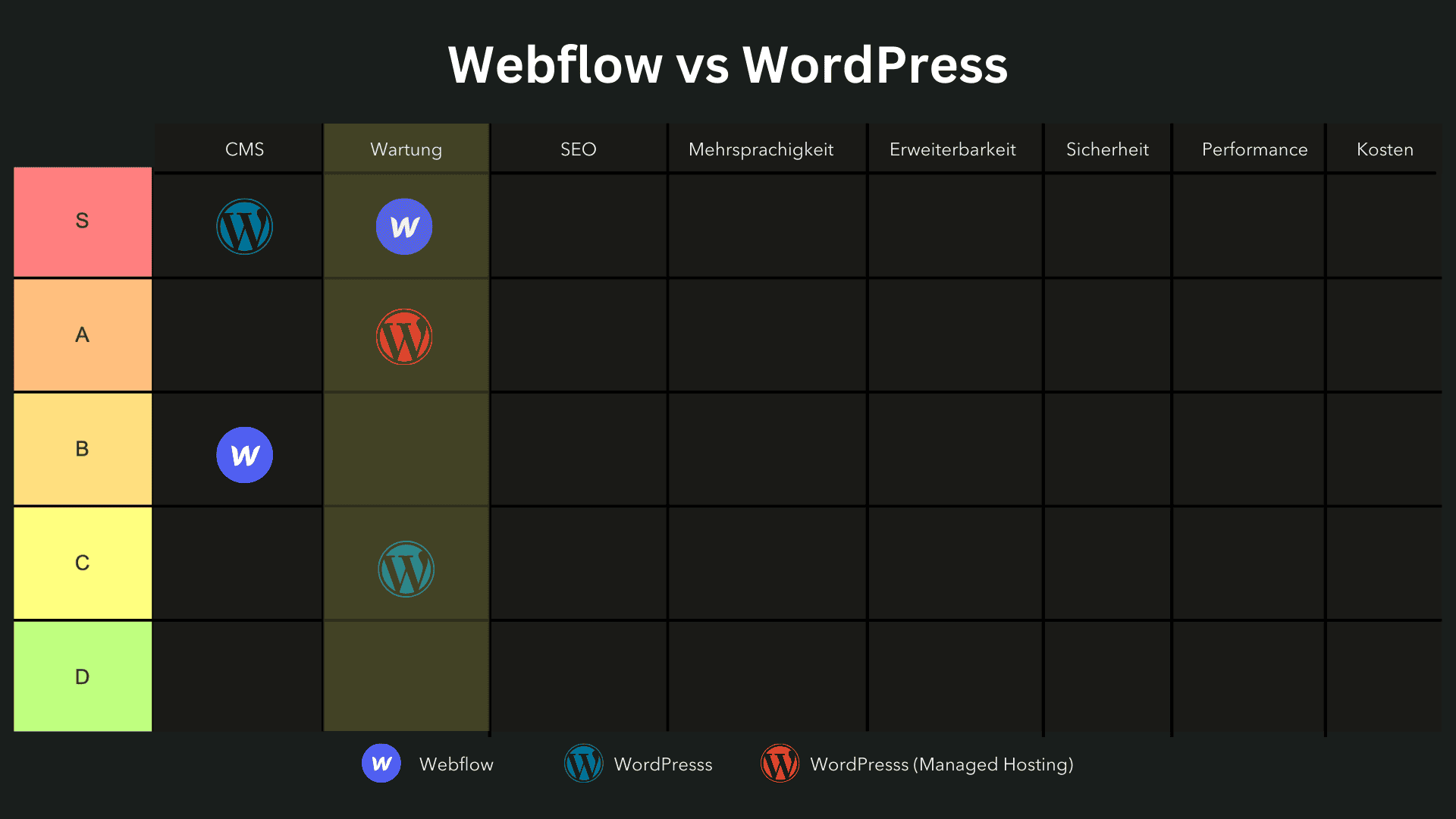
In Sachen Wartung und Updates hat Webflow in den meisten Fällen die Nase vorn, da es standardmässig Funktionen bietet, die den Wartungsaufwand deutlich reduzieren.
Webflow hostet Websites auf einem Content Delivery Network (CDN) und stellt standardmässig einen Staging-Server bereit, was es Nutzern ermöglicht, Änderungen und Updates zuerst in einer Testumgebung zu prüfen, bevor sie live gehen.
Diese integrierten Funktionen machen die Pflege und Wartung von Webflow-Seiten sehr unkompliziert und benutzerfreundlich.
Bei WordPress hingegen erfordert die Wartung regelmässige Aufmerksamkeit.
Insbesondere bei einem herkömmlichen Hosting muss man sicherstellen, dass alle Plugins und das Core-System in monatlichen Zyklen aktualisiert werden, was potenziell Fehler oder Kompatibilitätsprobleme verursachen kann.
Dieser Aufwand macht die Wartung einer WordPress-Website im Vergleich zu Webflow anspruchsvoller.
Allerdings gibt es für WordPress Managed Hosting-Optionen wie Kinsta, die den Wartungsaufwand erheblich reduzieren.
Managed WordPress-Hosting bietet automatisierte Updates, erhöhte Sicherheit und zusätzliche Supportleistungen, was WordPress im Vergleich zu Webflow nahezu gleichwertig in der Wartbarkeit macht.
Für unsere Kunden nutzen wir Managed Hosting, was die Pflege vereinfacht und mit Webflow auf eine Stufe stellt.
Einteilung:
- Webflow: S-Tier
- WordPress: C-Tier
- WordPress mit Managed Hosting: A-Tier
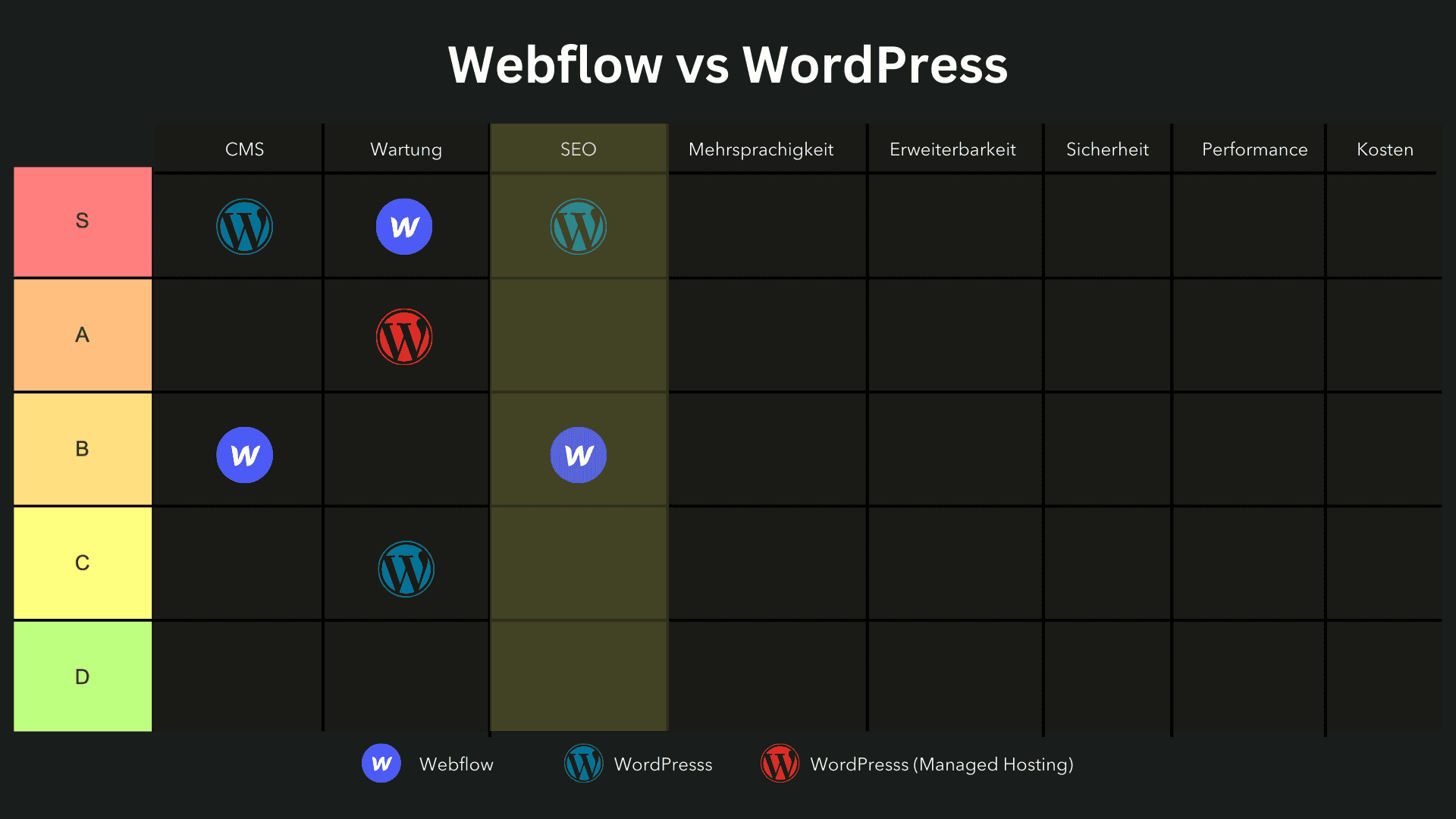
SEO
In puncto SEO hat WordPress die Nase vorn, da es standardmässig umfangreiche Funktionen und eine Vielzahl an spezialisierten Plugins bietet, die das Optimieren für Suchmaschinen sehr einfach machen.
Sowohl Webflow als auch WordPress bieten fortschrittliche SEO-Tools, um den Nutzern zu helfen, ihre Inhalte zu optimieren und organischen Traffic zu generieren.
Mit Plugins wie RankMath oder Yoast SEO können Nutzer die SEO-Elemente ihrer Website umfassend steuern und anpassen, einschliesslich Canonical-URLs, Meta-Beschreibungen und -Titel, interne Verlinkungen und mehr – alles ohne zusätzlichen Programmieraufwand.
In Webflow hingegen erfordert die Umsetzung vieler SEO-Standards zusätzlichen Aufwand und oft benutzerdefinierten Code.
Funktionen wie Canonical-URLs werden in Webflow nicht automatisch unterstützt und müssen manuell konfiguriert werden.
Auch grundlegende SEO-Elemente wie Meta-Beschreibungen und Meta-Titel für Blogseiten benötigen oft benutzerdefinierte Programmierung, was besonders für weniger technisch versierte Nutzer eine Hürde darstellen kann.
Ein weiteres Beispiel sind interne Verlinkungen, die in WordPress durch Plugins flexibel und effizient umgesetzt werden können.
Während Webflow hierfür zwar einige Optionen und ein Plugin anbietet, bleibt es in der Auswahl und Flexibilität hinter WordPress zurück.
Einteilung:
- Webflow: B-Tier
- WordPress: S-Tier
Mehrsprachigkeit
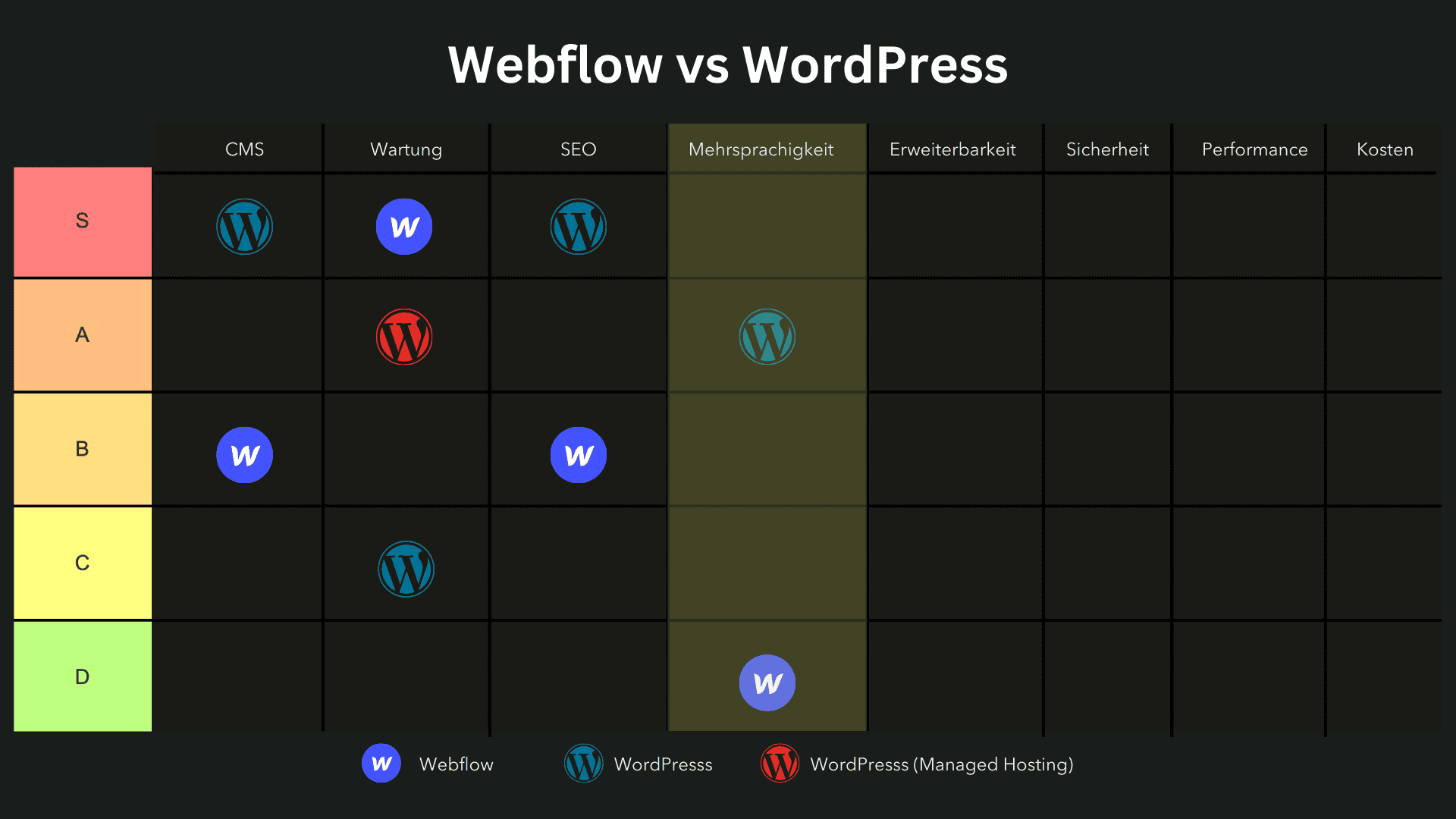
Bei der Mehrsprachigkeit zeigt sich ein deutlicher Vorteil für WordPress.
Während Webflow mittlerweile eine native Mehrsprachigkeitsfunktion bietet, bleibt diese in der Funktionalität und Flexibilität hinter den Möglichkeiten zurück, die WordPress mit Plugins wie WPML oder Polylang bietet.
Diese Plugins sind nicht nur kosteneffizient, sondern auch leistungsstark und erlauben es, eine mehrsprachige Website effizient zu erstellen und zu verwalten – und das zu einem Bruchteil der Kosten, die bei Webflow anfallen würden.
In Webflow gibt es das Plugin Weglot als Alternative, das jedoch sehr schnell teuer werden kann.
Da Weglot nach der Anzahl der übersetzten Wörter abrechnet, können die monatlichen Kosten für eine vollständig mehrsprachige Website schnell in den Bereich mehrerer hundert Schweizer Franken steigen.
Die native Mehrsprachigkeitsfunktion von Webflow, die 2024 eingeführt wurde, bietet nur begrenzte Möglichkeiten und bringt Herausforderungen in der Handhabung mit sich.
Auch aus SEO-Sicht gibt es Nachteile: Die korrekte Implementierung von hreflang-Tags und Canonical-URLs für mehrsprachige Seiten ist komplex und bei WordPress mit den richtigen Plugins wesentlich einfacher zu bewältigen.
Einteilung:
- Webflow: D-Tier
- WordPress: A-Tier
Erweiterbarkeit
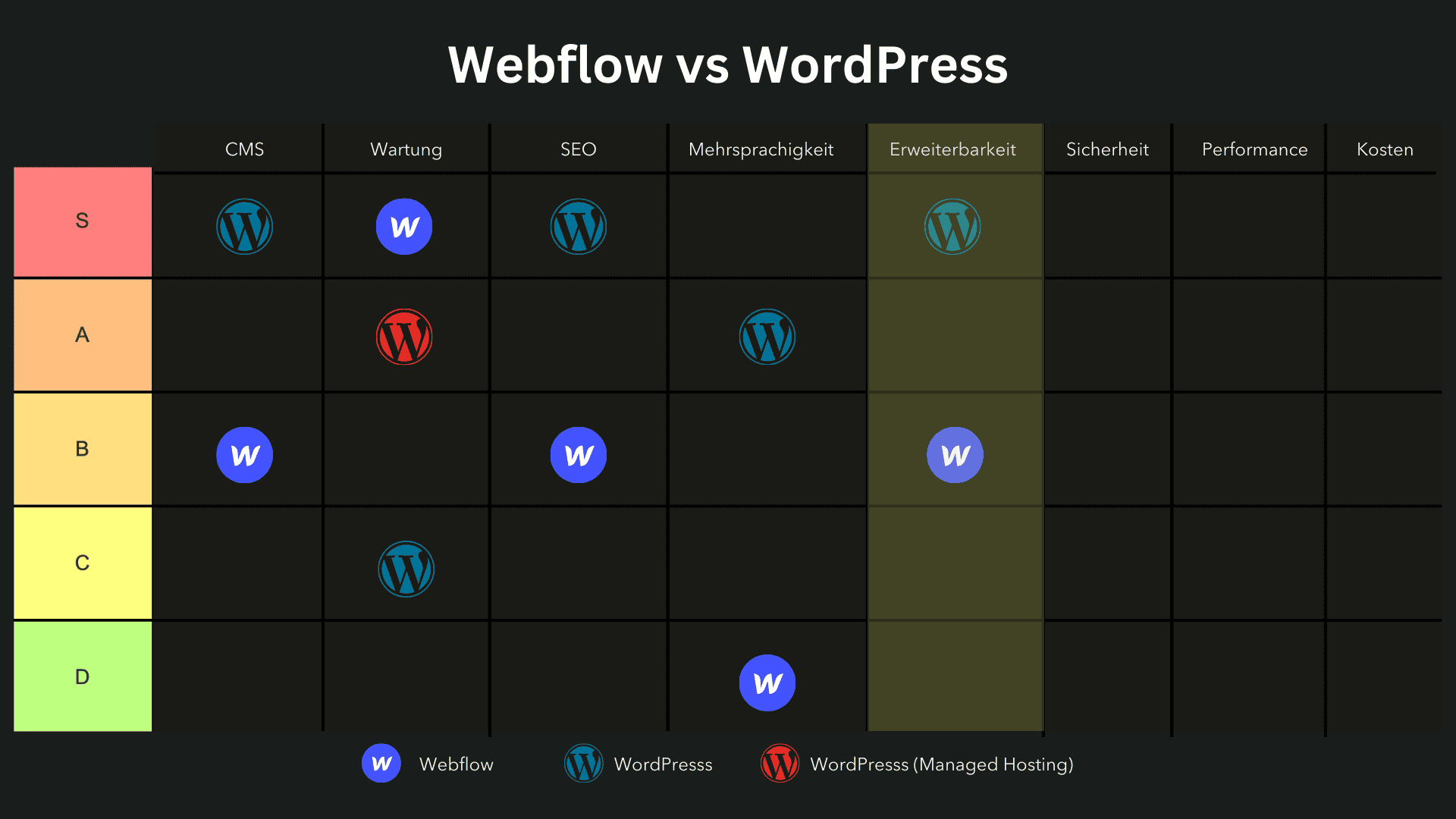
WordPress bietet nahezu unbegrenzte Möglichkeiten zur Funktionserweiterung.
Diese Vielfalt macht WordPress zur idealen Wahl für Websites, die über einfache Designs hinausgehen und eine hohe Funktionsvielfalt benötigen.
Webflow hingegen ist in der Erweiterbarkeit eingeschränkter.
Für grössere Websites oder Plattformen, die regelmässig skalieren und zusätzliche Funktionen benötigen, ist WordPress oft die bessere Wahl.
Es wird daher auch von vielen grossen Medienplattformen und Unternehmen genutzt, die Wert auf umfassende Erweiterungsmöglichkeiten legen.
Einteilung:
- Webflow: B-Tier
- WordPress: S-Tier
Sicherheit
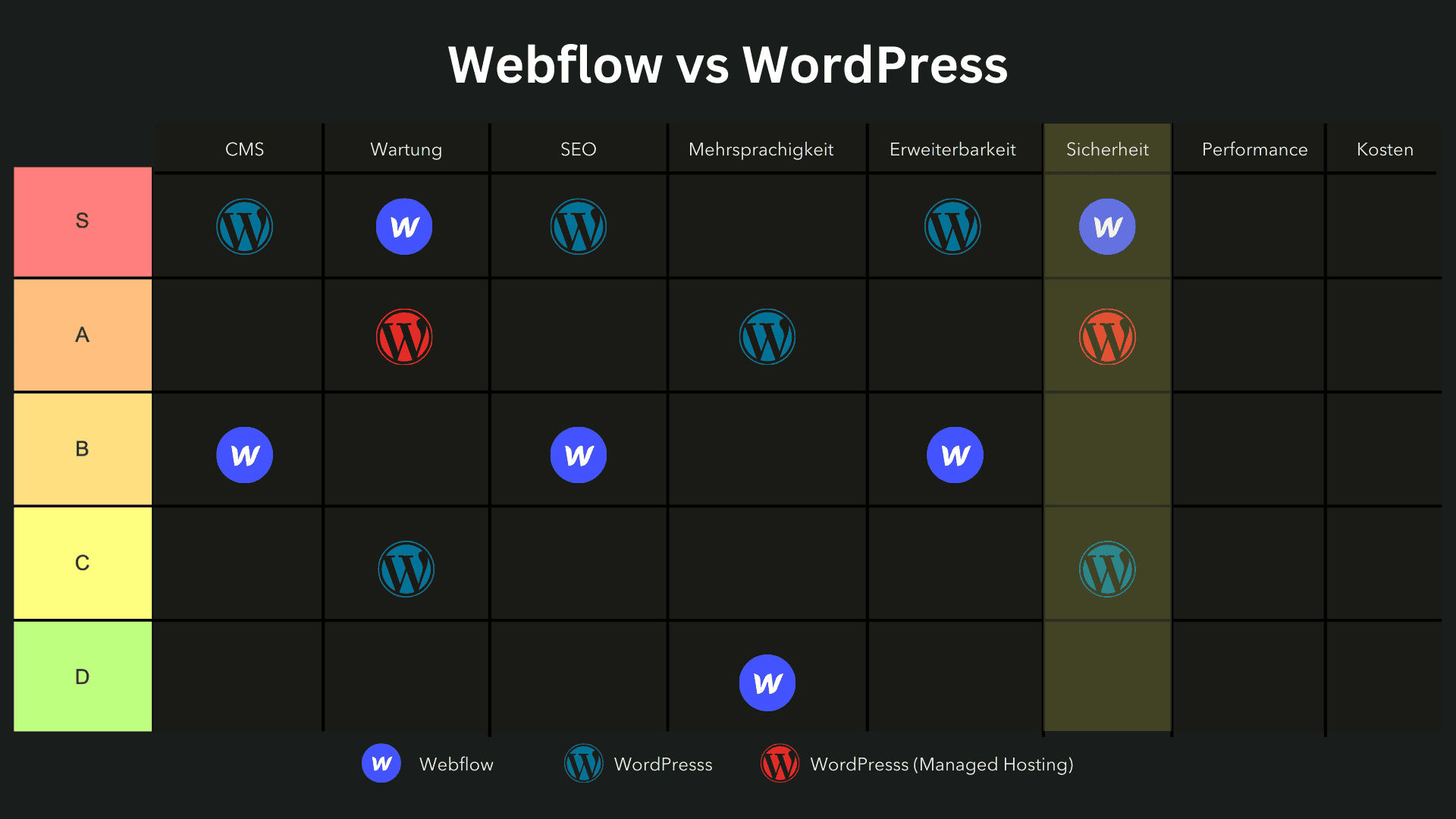
Durch seine geringere Verbreitung ist Webflow weniger anfällig für Hackerangriffe und bietet standardmässig SSL-Verschlüsselung und DDoS-Schutz.
Bei WordPress hingegen sind Sicherheitslücken ein häufiges Thema, da es auf einem Grossteil aller Websites läuft.
Mit Managed Hosting lässt sich die Sicherheit jedoch deutlich verbessern, und zusätzliche Schutzmassnahmen werden integriert.
Einteilung:
- Webflow: S-Tier
- WordPress: C-Tier
- WordPress mit Managed Hosting: A-Tier
Performance
Webflow bietet standardmässig eine hohe Performance, da es Websites auf einem globalen CDN hostet und somit schnelle Ladezeiten und zuverlässige Performance gewährleistet.
Die schlanke Programmierung trägt ebenfalls zu kürzeren Ladezeiten bei.
WordPress kann durch seine komplexe Struktur und Plugins die Ladezeiten beeinträchtigen, insbesondere bei herkömmlichem Hosting.
Managed WordPress Hosting, wie es Kinsta bietet, hebt die Performance jedoch auf das Niveau von Webflow und bietet ebenfalls CDN-Integration und schlankere Konfigurationen.
Einteilung:
- Webflow: S-Tier
- WordPress: B-Tier
- WordPress mit Managed Hosting: S-Tier
Hosting und Preis-Leistung
Ein wesentlicher Unterschied zwischen Webflow und WordPress liegt in der Hosting-Infrastruktur und den damit verbundenen Kosten.
Webflow bietet eine integrierte Hosting-Lösung, die auf der leistungsstarken Infrastruktur von Amazon Web Services (AWS) basiert.
Das bedeutet, dass Nutzer von Webflow keine zusätzlichen Kosten für das Hosting ihrer Website haben und sich nicht um die technische Verwaltung des Hostings kümmern müssen.
Diese All-in-One-Lösung kann besonders für kleinere Unternehmen und Einzelpersonen attraktiv sein, die eine unkomplizierte und zuverlässige Hosting-Option suchen.
WordPress hingegen bietet keine integrierte Hosting-Infrastruktur.
Nutzer müssen sich für einen externen Hosting-Anbieter entscheiden, was zusätzliche Kosten und Verwaltungsaufwand mit sich bringen kann.
Es gibt jedoch eine Vielzahl von Hosting-Optionen, die speziell für WordPress optimiert sind, wie z.B. Managed WordPress Hosting von Anbietern wie Kinsta.
Diese Lösungen bieten automatisierte Updates, erhöhte Sicherheit und Support, was den Wartungsaufwand erheblich reduziert und die Performance der Website verbessert.
Trotz der zusätzlichen Kosten kann diese Flexibilität für grössere Projekte und Unternehmen von Vorteil sein, die spezifische Hosting-Anforderungen haben.
Kosten
Die Kostenstruktur von Webflow erfordert sowohl einen Workspace-Plan als auch individuelle Site-Pläne, was für grössere Projekte oder Agenturen schnell teuer werden kann.
WordPress hingegen ist flexibel und kann durch eine Kombination aus Managed Hosting und Plugins zu geringeren Kosten betrieben werden.
Einteilung:
- Webflow: D-Tier
- WordPress: B-Tier
Anwendungsgebiete
Die Wahl zwischen Webflow und WordPress hängt auch stark von den spezifischen Anwendungsgebieten ab, für die die Plattformen genutzt werden sollen.
Webflow ist ideal für die Erstellung von professionellen und individuellen Webdesign-Projekten sowie E-Commerce-Websites.
Die Plattform bietet eine intuitive und designorientierte Benutzeroberfläche, die es Designern und Kreativen ermöglicht, komplexe visuelle Effekte und Animationen ohne tiefgehende Programmierkenntnisse zu erstellen.
Das macht Webflow besonders attraktiv für Agenturen und Freelancer, die hochwertige und individuelle Websites für ihre Kunden erstellen möchten.
WordPress hingegen ist besonders geeignet für die Erstellung von Blogs, Unternehmenswebsites und anderen Arten von Websites, die durch eine Vielzahl von Plugins erweitert werden können.
Mit einer riesigen Auswahl an Themes und Plugins können Nutzer den Look und die Funktionalität ihrer WordPress-Website genau an ihre Bedürfnisse anpassen.
Das macht WordPress zur idealen Wahl für Projekte, die eine hohe Flexibilität und Erweiterbarkeit erfordern.
Ob es sich um ein einfaches Blog oder eine komplexe Unternehmenswebsite handelt, WordPress bietet die Tools und Ressourcen, um nahezu jedes Website Projekt zu realisieren.
Fazit
Zusammenfassung der Vor- und Nachteile
Beide Plattformen haben ihre Stärken und Schwächen.
Webflow punktet mit hoher Performance und einfacher Wartung, während WordPress durch Flexibilität und eine breite Plugin-Bibliothek überzeugt.
Empfehlungen für Nutzergruppen:
- Unternehmen: Webflow für schlanke Projekte mit weniger Wartungsaufwand; WordPress für komplexe, skalierbare Projekte.
- Einzelpersonen/Blogger: WordPress bietet bessere SEO- und Blogging-Funktionen.
- Entwickler: Webflow für schnelle Design-Prototypen; WordPress für langfristige, komplexe Projekte.
Persönliche Empfehlung
Aus unserer Erfahrung empfehlen wir Webflow für Unternehmen, die Wert auf einfache Wartung und schlanke Performance legen, und WordPress für Projekte, die maximale Flexibilität und Anpassungsmöglichkeiten benötigen.
Häufig gestellte Fragen
Ist WordPress oder Webflow besser für SEO?
Die Wahl zwischen Webflow vs. WordPress im Bereich SEO hängt von den individuellen Anforderungen deines Website-Projekts ab.
WordPress bietet durch SEO-Plugins wie Yoast SEO oder Rank Math umfassende Anpassungsmöglichkeiten, um Meta-Titel, Meta-Beschreibungen, strukturierte Daten und Canonical-Tags zu optimieren.
Die Open-Source-Plattform erlaubt es zudem, jede einzelne SEO-Funktion manuell zu steuern und mit Premium-Plugins zu erweitern.
Webflow hingegen punktet mit einer sauberen Code-Struktur und einer direkt integrierten SEO-Optimierung.
Allerdings gibt es Einschränkungen bei der Verwaltung von strukturierten Daten, Canonical-URLs und erweiterten technischen SEO-Optimierungen, da viele Funktionen manuell über HTML, CSS und JavaScript konfiguriert werden müssen.
WordPress ist demnach die bessere Wahl für umfangreiche SEO-Strategien, während Webflow für einfache Website-Projekte mit schlankem Code eine solide Option bleibt.
Was sind die grössten Herausforderungen beim Wechsel von WordPress zu Webflow?
Der Wechsel von WordPress zu Webflow bringt einige Herausforderungen mit sich, insbesondere in Bezug auf Datenmigration, Plugins und SEO-Optimierung.
- Datenmigration & Content-Struktur: WordPress-Websites basieren auf einer MySQL-Datenbank, während Webflow eine eigene Struktur nutzt. Webflow bietet zwar eine CMS-Import-Funktion, aber bei komplexen Webseiten müssen Inhalte manuell übertragen werden.
- Plugins & Erweiterungen: In WordPress gibt es tausende Themes und Plugins, um eine Website individuell zu erweitern. In Webflow ist man auf das eingebaute System angewiesen, externe Integrationen sind begrenzt.
- SEO & URL-Struktur: Wer eine Website von WordPress auf Webflow umzieht, muss sicherstellen, dass alle 301-Weiterleitungen, hreflang-Tags und strukturierten Daten korrekt übertragen werden. Viele SEO-optimierte Plugins und Themes aus WordPress sind in Webflow nicht 1:1 nachzubilden.
- Kosten & Wartung: Webflow ist ein All-in-One-System, aber auch teurer als eine eigenständige WordPress-Installation. WordPress benötigt regelmässige Updates, bietet aber durch Open-Source-Software mehr langfristige Möglichkeiten zur Erweiterung und Skalierung.
Warum ist die Wahl des CMS wichtig?
Die Entscheidung für ein Content-Management-System (CMS) ist ein zentraler Bestandteil eines erfolgreichen Website-Projekts.
Sie beeinflusst die Benutzerfreundlichkeit, Skalierbarkeit, Kosten und Performance einer Webseite.
- Webflow bietet eine visuelle Oberfläche, ideal für Designer, die ohne Code arbeiten möchten. Es eignet sich für kleinere Projekte, bei denen Sicherheit und Wartung automatisch abgedeckt werden.
- WordPress als Open-Source-Plattform bietet maximale Flexibilität und ist durch die grosse Community sowie zahlreiche Themes und Plugins besonders anpassbar.
Wer eine hochgradig individualisierbare Website benötigt, ist mit WordPress besser beraten, insbesondere in den Bereichen SEO, E-Commerce-Funktionen und Skalierung.
Webflow hingegen ist ideal für Designprojekte oder Unternehmen, die eine wartungsarme Plattform suchen.