


Wix vs. WordPress – Die wichtigsten Unterschiede
Die Wahl zwischen Wix und WordPress hängt davon ab, welche Anforderungen dein Unternehmen an eine Website hat.
Während beide Plattformen es dir ermöglichen, schnell und einfach Websites zu erstellen, gibt es einige grundlegende Unterschiede.
Gerade weil sich Website-Builder und CMS in den letzten Jahren stark weiterentwickelt haben, lohnt sich ein Blick darauf, welche Lösung heute noch zeitgemäss ist.
Wenn du zusätzlich eine modernere Builder-Alternative prüfst, lohnt sich auch der Vergleich Webflow vs. WordPress.
Proprietäre Software vs. Open Source
Der wohl grösste Unterschied zwischen Wix und WordPress liegt im Software-Lizenzmodell.
Wix ist eine proprietäre Software.
Das heisst, der Quellcode ist nicht öffentlich zugänglich und darf nicht weitergegeben oder verändert werden.
Bei Wix bezahlst du dementsprechend für die Nutzung dieser Software.
Du kannst Apps aus dem vorgegebenen App-Store von Wix nutzen, aber keine eigenen Apps programmieren und mit Wix verknüpfen.
Die Modifikation des Quellcodes von Wix ist zudem nur begrenzt möglich. Diese Grenzen gibt die Wix-Software direkt vor.
Bei WordPress ist das anders, denn es handelt sich dabei um eine Open-Source-Plattform.
Das heisst, der Quellcode von WordPress ist öffentlich einsehbar, nutzbar und modifizierbar.
Einfach gesagt: Man kann mit dem Code von WordPress bauen, was man will, und die Software kostet dich nichts.
Das ist auch der Grund, warum sich rund um WordPress ein riesiges Ökosystem an Entwicklern versammelt hat, die zusätzliche Software-Erweiterungen (Plugins) für WordPress gebaut haben.
Heute gibt es schätzungsweise ca. 60’000 Plugins auf WordPress, die du kostenlos oder kostenpflichtig nutzen kannst.
Kurzer Exkurs: Viele meinen, dass WordPress aufgrund der Open-Source-Natur anfällig für Cyberattacken ist.
Genau das Gegenteil ist aber der Fall, wie ich dir hier erkläre.

Du planst einen Relaunch und brauchst Unterstützung? Als WordPress-Agentur aus Rotkreuz begleiten wir Unternehmen von der Analyse über Design und Entwicklung bis zum Marketing.
Wix Editor und Editor X
Der Standard Wix-Editor ist ein Website-Baukasten, der dir eine einfache Drag-and-Drop-Oberfläche bietet.
Du kannst eine Website erstellen, ohne technisches Wissen oder Programmierkenntnisse zu haben.
Alles wird über eine visuelle Benutzeroberfläche gesteuert, und es gibt viele vorgefertigte Designs (Templates) und einfache Funktionen.
Für fortgeschrittenere User und Agenturen bietet Wix den Editor X an. Er erlaubt es, individuelle Designs zu realisieren, die ein individuelles Layout gestalten möchten.
Gutenberg Editor und Webbuilder
WordPress ist ein flexibles Content-Management-System (CMS), das dir ebenfalls verschiedene Gestaltungsmöglichkeiten gibt.
Du kannst sowohl mit vorgefertigten Templates arbeiten wie zum Beispiel von AstraThemes oder ThemeForest als auch ein komplett individuelles Design erstellen.
Viele User und Agenturen arbeiten bei WordPress mit einem Webbuilder wie Elementor oder Divi und nicht auf dem Standard Gutenberg Editor.
Der Gutenberg Editor eignet sich beispielsweise gut für einen Blog oder simple Layouts. Er ist standardmässig auf jeder WordPress-Website installiert.
Für anspruchsvollere Custom Designs lohnt es sich aber zusätzlich, einen Webbuilder wie Elementor zu nutzen.
Elementor funktioniert ebenfalls nach dem Baukasten-Prinzip.
Du kannst per Drag-and-drop vorgefertigte Sektionen und Module verwenden oder auch direkt und individuell Sektionen designen.
Hosting
Wenn du bei Wix eine Website erstellst, dann wird deine Website automatisch auf deinen Wix-Servern oder einem AWS (Amazon Web Services) von Wix gehostet.
Du musst dich nicht um das Hosting kümmern, hast aber auch keine Flexibilität, den besten und schnellsten Server zu wählen.
Alle Websites bei Wix sind auf einem Shared Hosting, das heisst, deine Website liegt auf dem gleichen Server wie viele andere Websites.
Der Vorteil davon ist die Kosteneffizienz.
Der Nachteil eines Shared Hostings ist, dass es relativ langsam ist, was sich negativ auf deine Ladezeiten und Suchmaschinenoptimierung (SEO) auswirken kann – besonders wenn du ein erhöhtes Traffic-Aufkommen verzeichnest.
Suchmaschinenoptimierung (SEO)
Viele die eine neue Website bauen, möchten diese anschliessend via SEO oder Suchmaschinen Advertsing (SEA) vermarkten.
Auch hier gilt es, einige Unterschiede zu beachten.
WordPress ist ein natives Blogging-Tool und bietet schon aufgrund dieser Tatsache sehr viele Funktionen, wenn es darum geht, Content zu bearbeiten.
Zudem können durch SEO-Plugins wie RankMath oder Yoast super schnell strukturierte Daten, Canonicals, Meta-Elemente oder 301-Weiterleitungen hinterlegt werden.
Wix hingegen bietet zwar auch grundlegende Funktionen, aber bereits beim Hinterlegen von strukturierten Daten muss man externe Markup-Generatoren nutzen, um dies auf der Website zu implementieren.
Des Weiteren können durch die freie Hostingwahl bei WordPress durch Managed WordPress-Lösungen wie Kinsta oder Siteground oder Plugins wie WPRocket zusätzliche Performance-Optimierungen wie serverseitiges Caching und CSS- und Javascript-Optimierungen vorgenommen werden.
E-Commerce
Auch hier bieten beide Plattformen einen etwas unterschiedlichen Ansatz.
WordPress wurde wie bereits erwähnt ursprünglich als Blogging-Tool entwickelt.
Mit dem WooCommerce-Plugin gibt es aber eine Möglichkeit, auch einen Online-Shop über WordPress zu betreiben.
Das WooCommerce-Plugin kann mit seinen Standardfunktionen kostenlos genutzt werden.
Die Wahrscheinlichkeit ist aber gross, dass bei spezifischen Funktionswünschen weitere (auch kostenpflichtige) Plugins dazukommen.
Einen externen Zahlungsanbieter wie beispielsweise Worldline muss man bei WooCommerce ebenfalls selbst organisieren und dann über ein Plugin anbinden.
Wix bietet auch im E-Commerce-Bereich ein All-in-One-System mit Hosting, Designfunktionalität und Zahlungsabwicklung.
Wix ist daher eine super Lösung für kleinere bis mittelgrosse Shops, die schnell loslegen.
Das Problem bei Wix ist im E-Commerce meistens die Performance.
Gerade für grössere Online-Stores ist Wix oftmals keine Option, weil ab einer gewissen Shopgrösse die Standard-Server einfach überlastet werden.
Nun haben wir uns die wichtigsten Unterschiede angeschaut.
Hier nochmals alles im Überblick:
| Feature | Wix | WordPress |
|---|---|---|
| Bedienung | Einfach | visuell anspruchsvoller, aber flexibel |
| Hosting | Inklusive | Selbst wählbar |
| Designmöglichkeiten | Vorlagen oder individuelles Design möglich | Vorlagen oder individuelles Design möglich |
| Erweiterungen | Wix hat einen eigenen App Store, jedoch nicht so viele Plugins vorhanden | WordPress hat für jede Funktion ein Plugin und insgesamt mehr als 60’000 Plugins |
| SEO | Basisfunktionen vorhanden | Sehr gut für SEO geeignet |
| Kosten | Monatliches Abo bei Wix | Abhängig von Hosting und Plugins |
Für wen eignet sich welches System?
Wix ist ideal für:
- Anfänger, die ohne technisches Wissen eine Website erstellen wollen
- Kleine Unternehmen, Freelancer oder Künstler, die schnell eine ansprechende Website benötigen
- Nutzer, die sich nicht mit Hosting, Updates und technischen Einstellungen beschäftigen möchten
WordPress ist besser für:
- Personen und Unternehmen, die eine professionelle Website aufbauen wollen
- Unternehmen, die eine skalierbare Lösung mit mehr Funktionen und Kontrolle suchen
- Nutzer, die sich mit SEO, Online-Shops oder individuellen Anpassungen beschäftigen möchten
Wix erleichtert dir den Einstieg, während WordPress dir mehr Möglichkeiten gibt, wenn du deine Website langfristig optimieren und erweitern möchtest.
Welche Plattform für dich besser ist, hängt davon ab, wie viel Flexibilität, Kontrolle und Skalierbarkeit du brauchst.
Wix – Der einfache Website-Baukasten für Einsteiger
Wix ist ein Website-Baukasten, der sich speziell an Anfänger richtet.
Wenn du schnell eine ansprechende Webseite erstellen willst, ohne dich mit Hosting, Code oder komplexen Einstellungen auseinanderzusetzen, ist Wix eine super Lösung.
Wie funktioniert Wix?
Mit Wix kannst du deine Website per Drag-and-Drop gestalten.
Du musst keine Programmierung lernen oder dich mit Hosting-Anbietern auseinandersetzen.
Alles läuft über eine zentrale Plattform, bei der du:
- Ein Design-Template auswählst
- Inhalte einfach per Baukasten-Prinzip hinzufügst
- Apps und Premium-Funktionen über den App-Markt integrierst
- Hosting und technische Updates automatisch verwalten lässt
Wix bietet demnach eine intuitive Oberfläche, die es auch ohne Erfahrung leicht macht, eine professionelle Website zu erstellen
Vor- und Nachteile von Wix
Vorteile von Wix
- Einfache Bedienung: Dank der Drag-and-Drop-Oberfläche kannst du deine Website direkt gestalten.
- Schneller Start: Du brauchst keine Installation oder Hosting-Einstellungen – alles funktioniert direkt.
- Integrierte Funktionen: Viele Features wie SEO-Optionen, Formulare und Online-Shop-Funktionen sind bereits enthalten.
- App-Markt: Du kannst zusätzliche Funktionen wie Buchungssysteme oder Newsletter-Tools hinzufügen.
- Sicherheit und Wartung: Wix übernimmt automatisch Updates und Hosting-Sicherheit.
Nachteile von Wix
- Eingeschränkte Flexibilität: Im Vergleich zu WordPress kannst du den Code nicht direkt bearbeiten oder eigene Funktionen programmieren.
- Vorlagen-Beschränkung: Einmal gewählte Templates lassen sich später nur schwer ändern.
- Langfristige Kosten: Wix basiert auf einem Abo-Modell, das je nach Funktionen teuer werden kann.
- SEO und Ladegeschwindigkeit: Die Möglichkeiten zur SEO-Optimierung sind begrenzter als bei WordPress.
- Abhängigkeit von Wix: Deine Website bleibt an die Plattform gebunden – du kannst sie nicht einfach auf einen anderen Hosting-Anbieter übertragen.
Einfache Bedienung, aber eingeschränkte Flexibilität
Wix macht den Einstieg leicht, aber sobald du individuelle Anpassungen möchtest, stösst du schnell an Grenzen.
Während du mit WordPress fast alles selbst gestalten kannst, bist du bei Wix auf die bereitgestellten Vorlagen und Apps angewiesen.
Design-Freiheit vs. Vorlagen-Beschränkung
Wix bietet dir viele Templates und Designmöglichkeiten, aber:
- Du kannst Farben, Schriftarten und Inhalte frei anpassen.
- Du kannst nach der ersten Auswahl dein Template nicht einfach wechseln, ohne die gesamte Website neu aufzubauen.
Falls du langfristig eine hochgradig anpassbare Website möchtest, ist WordPress die bessere Wahl.
Kosten und Hosting bei Wix
Wix bietet verschiedene Pakete an, die je nach Funktionsumfang variieren:
| Paket | Wix-Kosten | Hauptfunktionen |
|---|---|---|
| Kostenlos | 0€ pro Monat | Wix-Branding vorhanden, bietet grundlegende Funktionen |
| Light | 14€ pro Monat | Keine Wix-Werbung, verbinde deine eigene Domain, 2 GB Speicherplatz, grundlegende Marketing-Tools |
| Core | 25€ pro Monat | Kostenlose Domain für 1 Jahr, 50 GB Speicherplatz, Zahlungen annehmen, 5 Team-Mitglieder. |
| Business | 34€ pro Monat | Standard-E-Commerce-Funktionen, 100 GB Speicherplatz, Standard-Marketing-Suite, 10 Team-Mitglieder. |
| Business Elite | 149€ pro Monat | Erweiterte E-Commerce-Funktionen, unbegrenzter Speicherplatz, erweiterte Marketing-Tools, bis zu 100 Mitwirkende. |
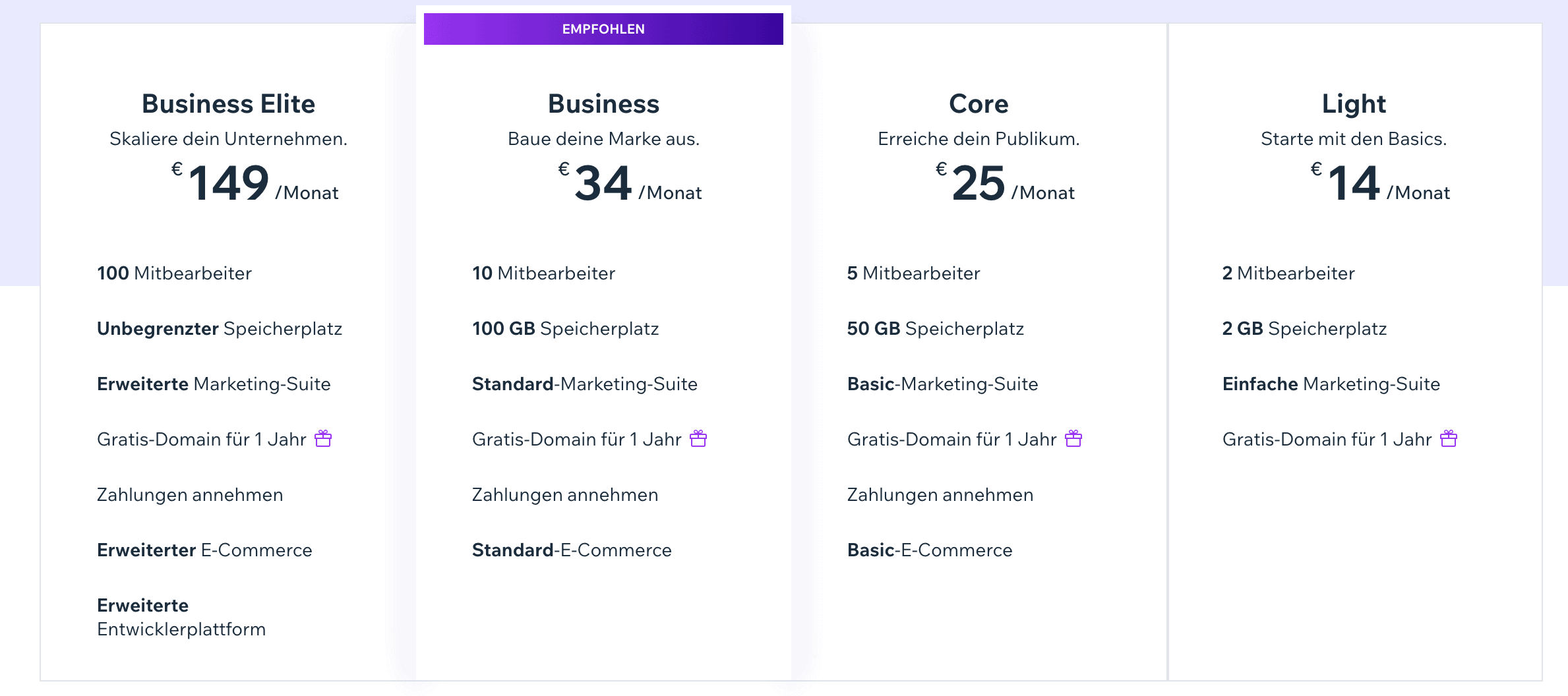
Hosting ist immer inklusive, aber du kannst Wix nicht auf einen eigenen Server umziehen.
Hinweis: Alle Preise sind korrekt zum Stand 13. April 2026
Bietet Wix ein kostenloses Abo an?
Ja, es gibt bei Wix auch ein kostenloses Abo. Allerdings mit einigen Einschränkungen.
WordPress – Das CMS für individuelle Webseiten
WordPress ist das weltweit meistgenutzte Content-Management-System (CMS) und bietet maximale Flexibilität für jede Art von Website.
Egal, ob du einen Blog, eine Firmenwebsite oder einen Online-Shop erstellen willst – mit WordPress kannst du alles umsetzen.
Was macht WordPress so flexibel?
- Open-Source-Plattform: Du kannst den Code anpassen und deine Website individuell gestalten.
- Themes & Plugins: Tausende von kostenlosen und kostenpflichtigen Erweiterungen ermöglichen unendliche Anpassungen.
- Eigene Hosting-Wahl: Du kannst WordPress auf jedem Hosting-Anbieter betreiben.
- E-Commerce-Integration: Mit WooCommerce lassen sich vollständige Online-Shops umsetzen.
- SEO-Optimierung: WordPress bietet bessere SEO-Funktionalität als viele Baukastensysteme.
WordPress erfordert mehr technisches Know-how als Wix, aber dafür hast du die volle Kontrolle über deine Website.
WordPress.com vs. WordPress.org
Viele verwechseln WordPress.com und WordPress.org, dabei gibt es wichtige Unterschiede:
| wordpress.com | wordpress.org | |
|---|---|---|
| Hosting | inklusive | eigenes Hosting nötig |
| Flexibilität | eingeschränkt | maximale Kontrolle |
| Eigene Plugins | nur in teuren Tarifen | vollständige Anpassungen |
| Geeignet für | Anfänger | Profis und Unternehmen |
Wenn du volle Kontrolle willst, ist WordPress.org die bessere Wahl.
WordPress.com ist eher für einfache Webseiten, ohne technische Anpassungen gedacht.
Vor- und Nachteile von WordPress
Vorteile von WordPress
- Maximale Anpassung: Du kannst Themes, Plugins und den Code nach deinen Wünschen verändern.
- Grosse Community: Tausende Entwickler sorgen für regelmässige Updates und Verbesserungen.
- SEO-Optimierung: Durch Plugins wie Yoast SEO oder Rank Math hast du erweiterte SEO-Optionen.
- E-Commerce-Funktionen: WooCommerce bietet eine leistungsstarke Lösung für Online-Shops.
- Unabhängigkeit: Du bist nicht an einen Anbieter gebunden und kannst das Hosting jederzeit wechseln.
Nachteile von WordPress
- Höhere Lernkurve: Im Vergleich zu Wix ist WordPress komplexer in der Einrichtung.
- Wartungsaufwand: Du musst Updates für WordPress, Plugins und Themes selbst durchführen.
- Sicherheitsrisiken: Eine unsichere Konfiguration kann Angriffe ermöglichen – regelmässige Updates sind Pflicht.
- Hosting und Domain separat: Du musst selbst einen Hosting-Anbieter wählen und deine Domain verwalten.
Maximale Kontrolle, aber höhere Lernkurve
WordPress gibt dir volle Kontrolle über deine Website, aber du musst dich mit Hosting, Updates und Plugins beschäftigen.
Wenn du eine langfristige, professionelle Website mit hoher Flexibilität willst, ist WordPress die beste Wahl.
Themes & Plugins
- Themes: Es gibt tausende kostenlose und Premium-Themes, die du individuell anpassen kannst.
- Plugins: Erweiterungen für SEO, Sicherheit, Performance oder Marketing stehen in grosser Auswahl zur Verfügung.
Aber:
- Du musst Plugins regelmässig aktualisieren, um Sicherheitslücken zu vermeiden.
- Nicht jedes Theme oder Plugin ist gut programmiert – eine sorgfältige Auswahl ist wichtig.
Hosting-Optionen und Kosten für WordPress
Im Gegensatz zu Wix musst du bei WordPress.org dein eigenes Hosting wählen.
Die Kosten hängen von deinen Anforderungen ab:
| Tarif | Kosten | Hauptfunktionen |
|---|---|---|
| Shared Hosting | CHF 3–10 pro Monat | Kleine Websites, Blogs |
| Managed Wordpress-Hosting | CHF 10–30 pro Monat | Unternehmen, prof. Websites |
| VPS / Dedicated Hosting | CHF 30–100 pro Monat | Grosse Shops, hohe Besucherzahl |
Zusätzliche Kosten können anfallen für:
- Premium-Themes (CHF 30–100 einmalig)
- Plugins (z. B. SEO-Tools, Sicherheitslösungen)
- Wartung und Sicherheit
Was kann Wix besser, was kann WordPress besser?
Im folgenden Abschnitt möchte ich eine Bewertung der beiden Systeme Wix und WordPress vornehmen.
Diese Bewertung basiert auf einer Reihe von Kriterien, welche man bei der Wahl eines CMS aus unserer Sicht auf jeden Fall beachten sollte.
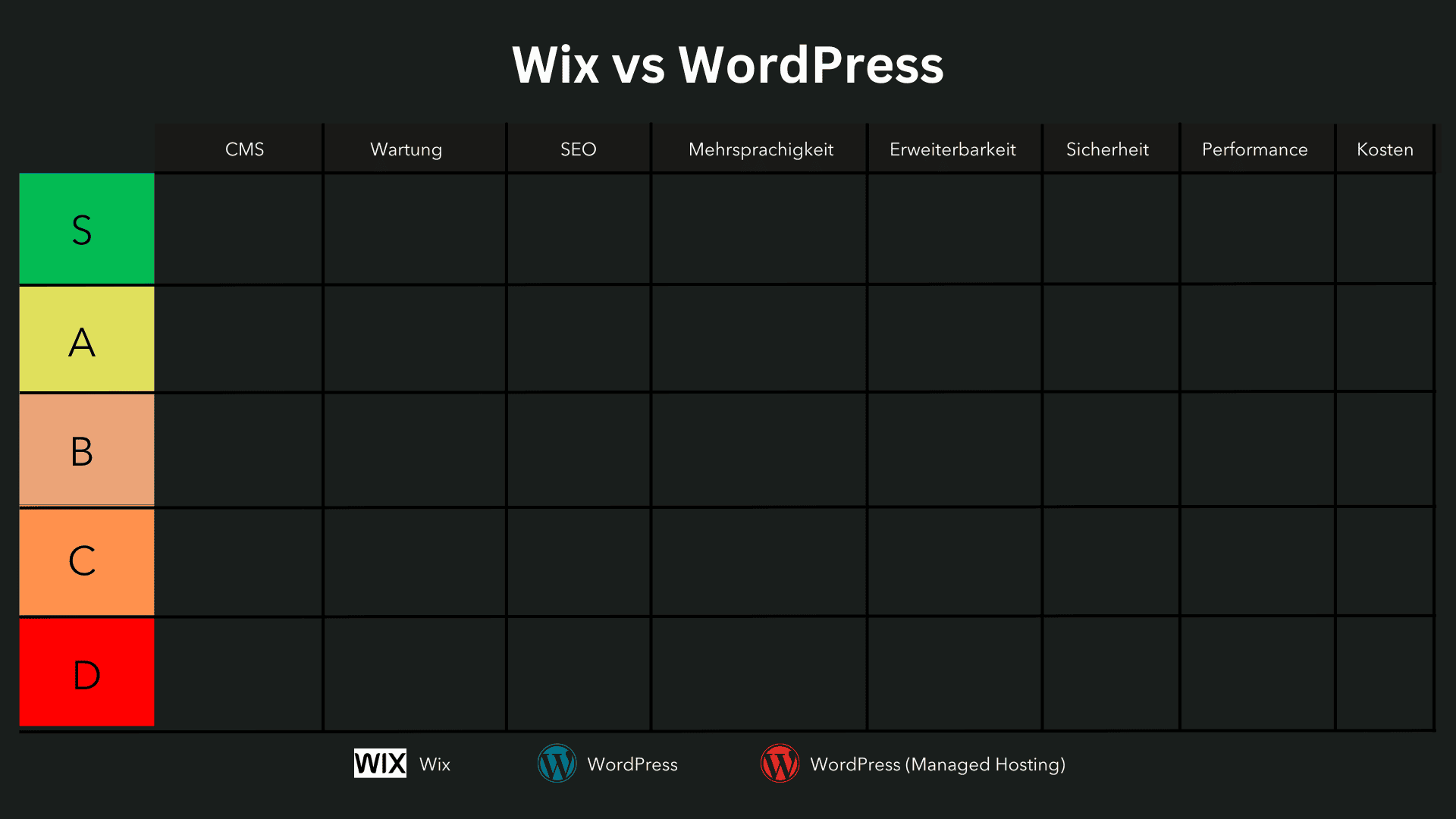
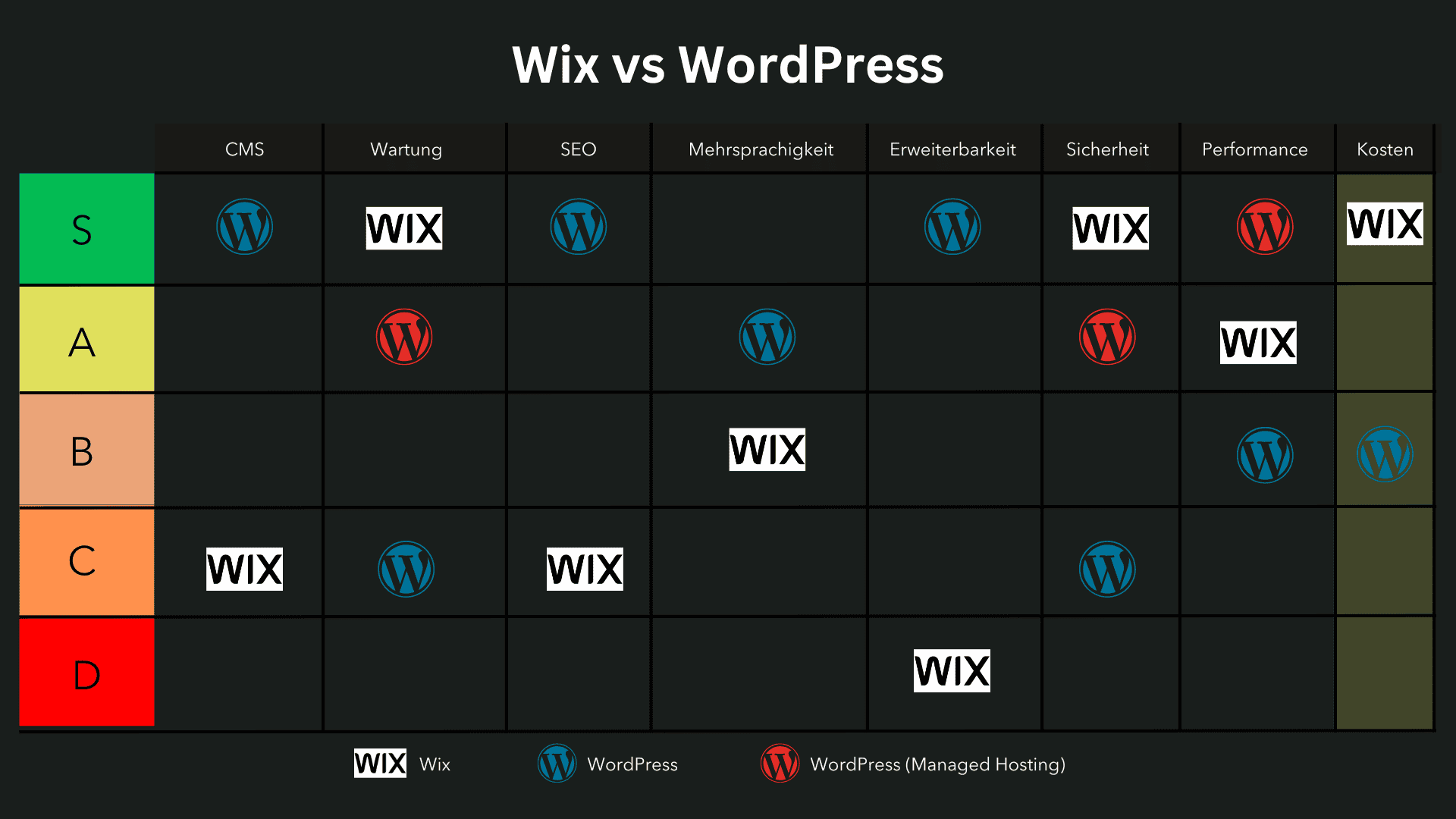
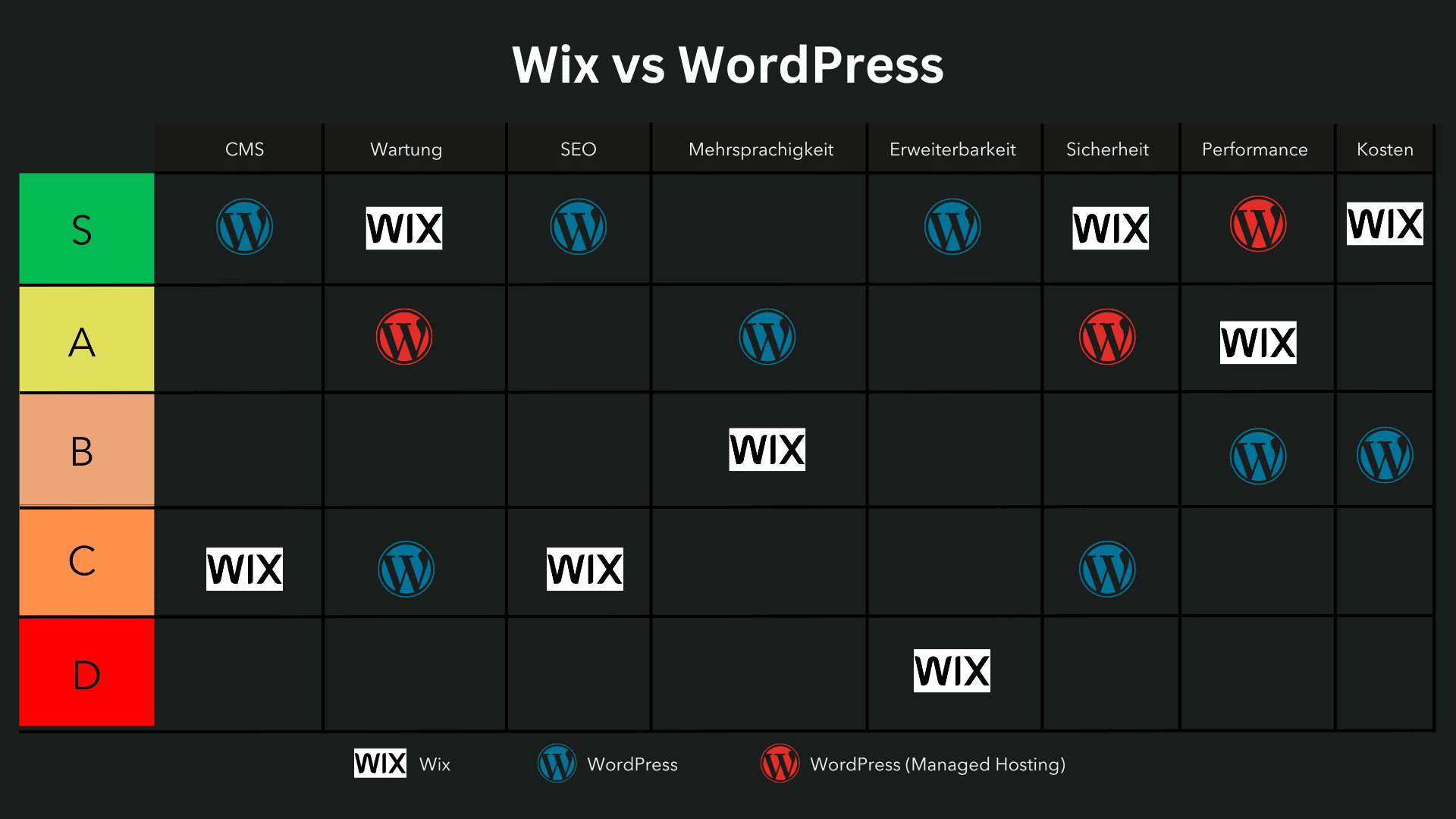
Die Kategorien werden in einem Tier-System dargestellt, um die Leistung der beiden Plattformen klar zu visualisieren:
Bewertungssystem
- S-Tier: Die Plattform erfüllt alle Anforderungen ausgezeichnet und bietet aussergewöhnliche Vorteile.
- A-Tier: Die Plattform bietet grossartige Funktionen mit wenigen Einschränkungen.
- B-Tier: Eine solide Wahl mit guten Funktionen, aber einigen Schwächen.
- C-Tier: Erfüllt einige Grundanforderungen, weist jedoch signifikante Mängel auf.
- D-Tier: Erfüllt die meisten Anforderungen nicht und eignet sich nur für sehr grundlegende Projekte.
Kriterien für die Bewertung:
- Content-Management (CMS): Bewertet die Benutzerfreundlichkeit und Flexibilität der Plattformen bei der Verwaltung und Organisation von Inhalten.
- Design und Anpassungsmöglichkeiten: Analysiert, wie gut sich die Plattformen an individuelle Designwünsche anpassen lassen und welche kreativen Freiheiten sie bieten.
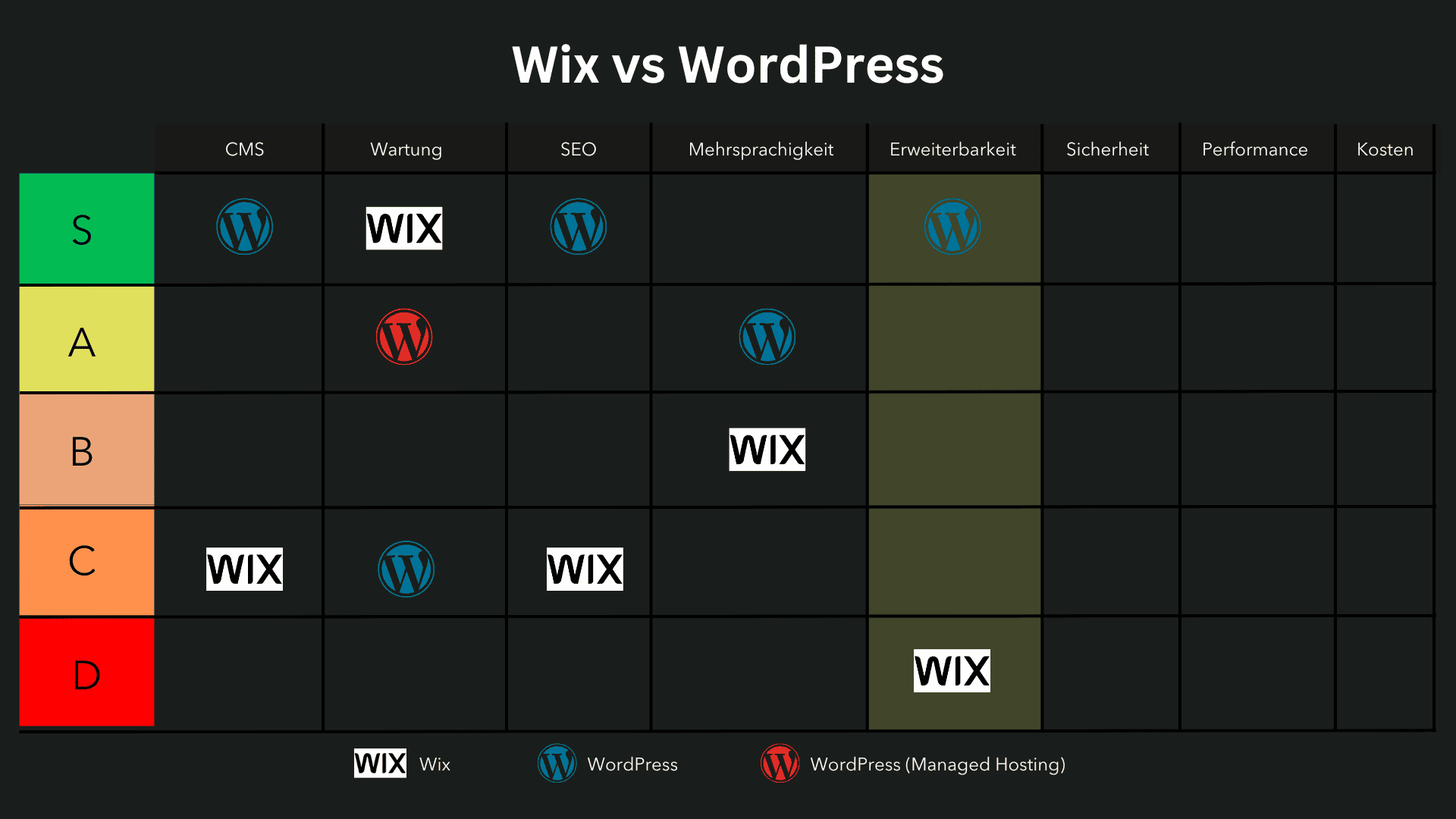
- Erweiterbarkeit: Untersucht die Verfügbarkeit und Qualität von Plugins und Erweiterungen, um zusätzliche Funktionen und Integrationen hinzuzufügen.
- SEO: Bewertet die integrierten Funktionen und Anpassungsoptionen für Suchmaschinenoptimierung zur Verbesserung der Sichtbarkeit.
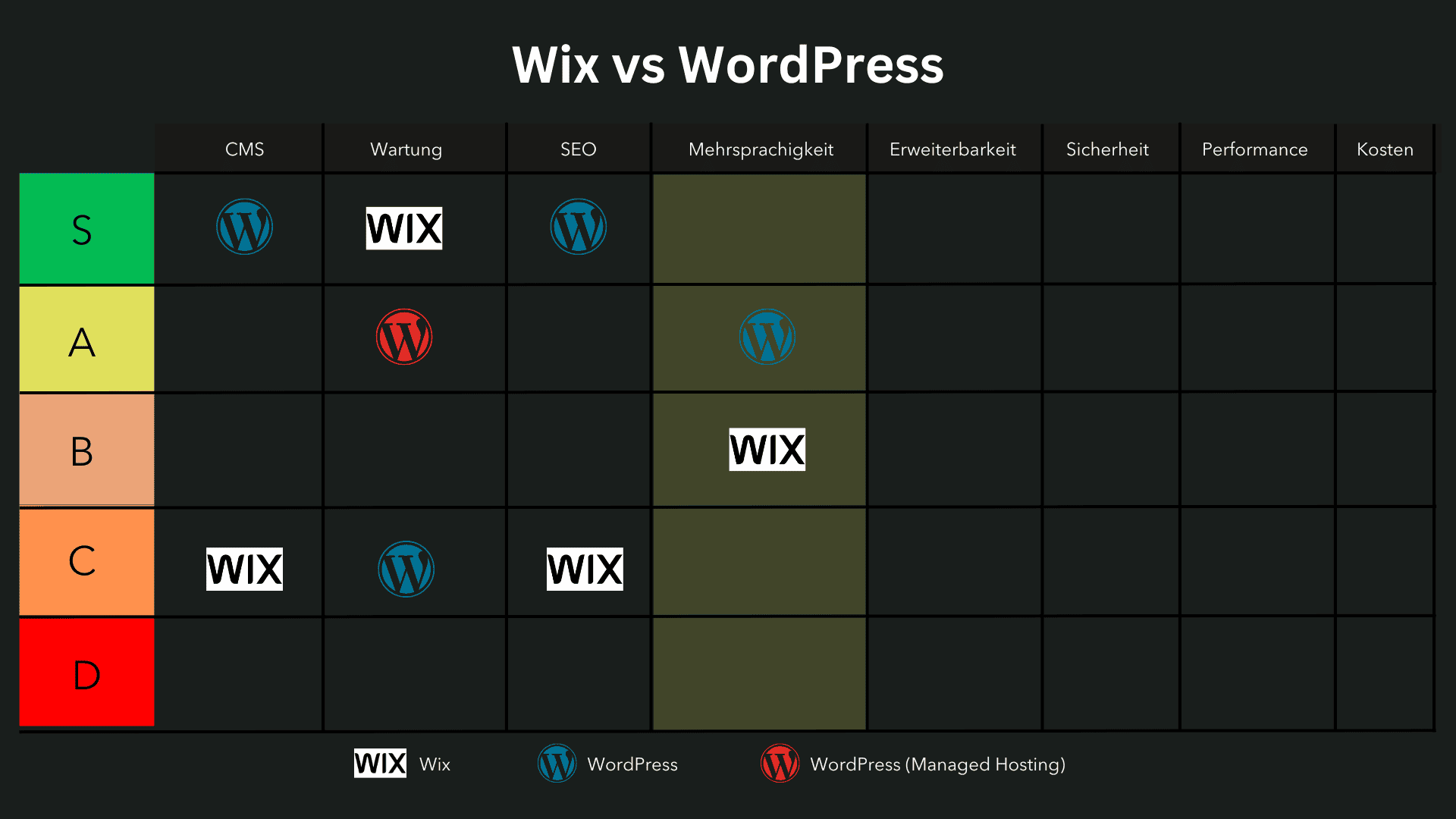
- Mehrsprachigkeit: Analysiert die Eignung der Plattformen zur Unterstützung und Verwaltung mehrsprachiger Websites.
- Wartung und Updates: Bewertet den Aufwand für die Pflege und Aktualisierung der Plattformen, einschliesslich der Häufigkeit und Einfachheit von Updates.
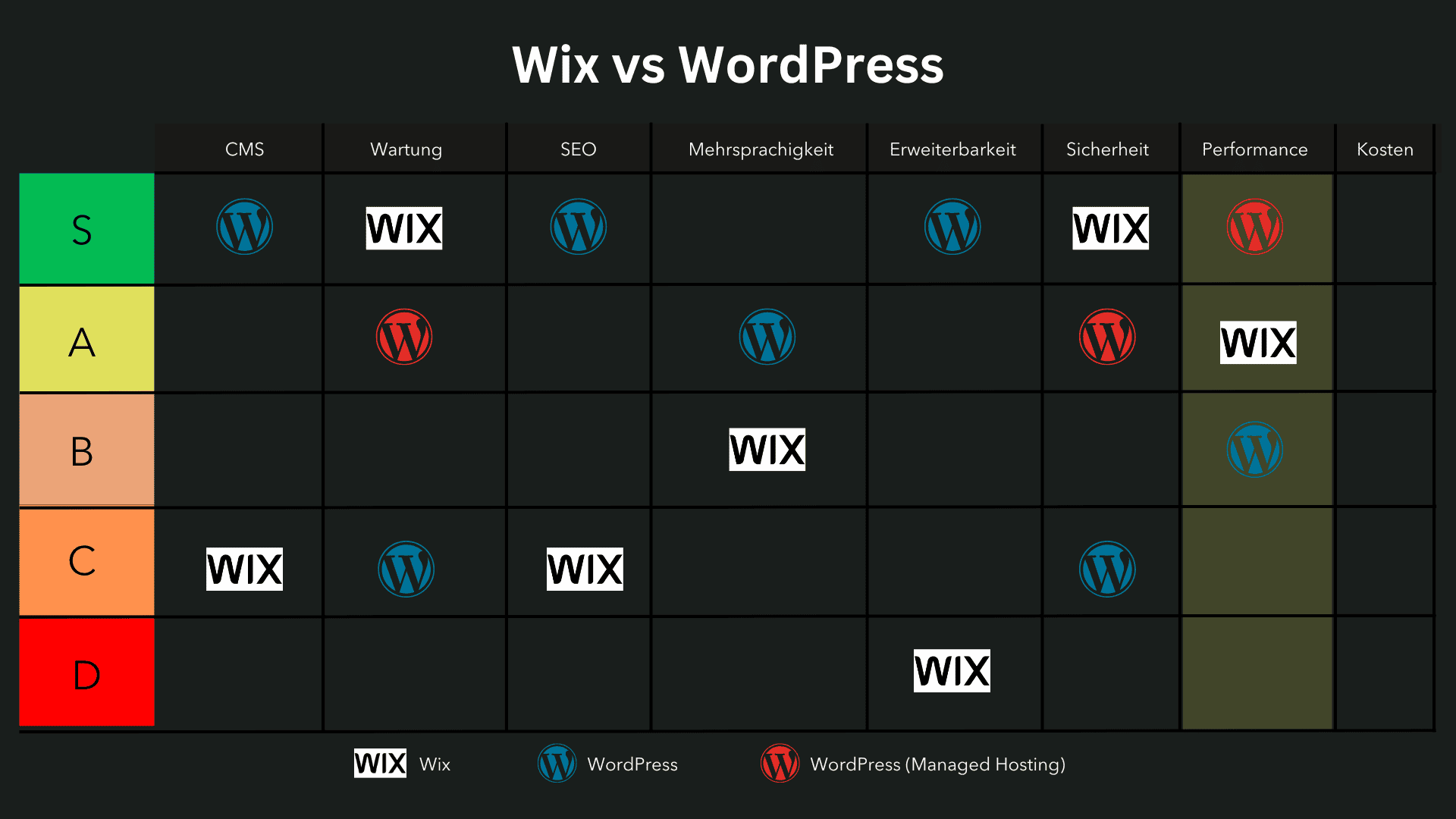
- Performance: Misst die Ladegeschwindigkeit und technische Effizienz der Plattformen, insbesondere bei steigender Besucherzahl und Content-Menge.
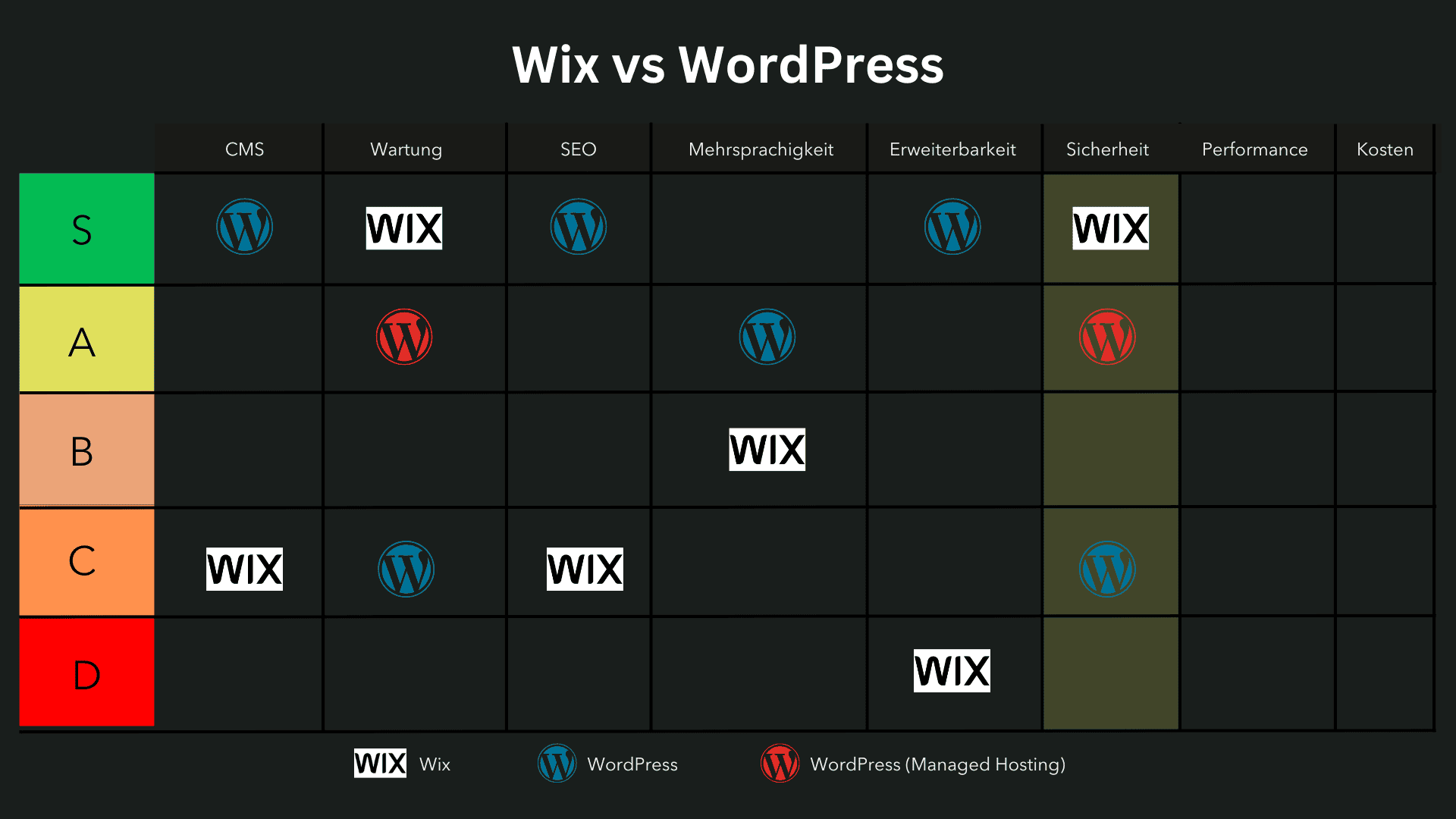
- Sicherheit: Untersucht die eingebauten Sicherheitsfunktionen und die Anfälligkeit gegenüber potenziellen Sicherheitsbedrohungen.
- Kosten: Vergleicht die Preisstruktur und die langfristigen Kosten, die für die Nutzung und Skalierung der Plattformen anfallen.
Tipp: Beide Plattformen haben eine Lernkurve, insbesondere wenn man als Anfänger eine Website selbst erstellen möchte.
Alle diese Kriterien werden bewertet und in die entsprechenden Tier-Kategorien eingeordnet.
Diese Einteilung ermöglicht es, die Stärken und Schwächen von Wix und WordPress klar zu visualisieren und zu verstehen, welche Plattform für welche Art von Projekten am besten geeignet ist.
Content-Management in Wix und WordPress
Beide Plattformen bieten grundlegende Funktionen zur Verwaltung von Inhalten, doch WordPress bietet hier deutlich mehr Flexibilität und Funktionsumfang.
Wix setzt auf einen visuellen Drag-and-Drop-Editor, der das Erstellen und Bearbeiten von Inhalten sehr einfach macht.
Für kleinere Websites mit wenigen Unterseiten ist das ideal, da Nutzer keine technischen Kenntnisse benötigen.
Allerdings gibt es Einschränkungen: Während WordPress Kategorien, Tags und erweiterte Taxonomien von Haus aus bietet, sind diese Funktionen bei Wix nur eingeschränkt vorhanden.
Wix eignet sich gut für einfache Seiten mit statischem Content, ist aber weniger für umfangreiche Blogs, Magazine oder dynamische Inhaltsstrukturen geeignet.
Zudem gibt es keinen direkten Zugriff auf den Code, sodass individuelle Anpassungen kaum möglich sind.
Bei umfangreichen Content-Projekten stösst Wix an seine Grenzen.
Websites mit hunderten oder tausenden Unterseiten können an Ladegeschwindigkeit verlieren, und die Möglichkeiten zur Sortierung und Verwaltung von Inhalten sind begrenzt.
Während WordPress hierfür Plugins und native Optionen bietet, fehlen in Wix viele dieser Funktionen – etwa für das Einfügen von Tabellen oder für die erweiterte Sortierung und Markierung von Inhalten.
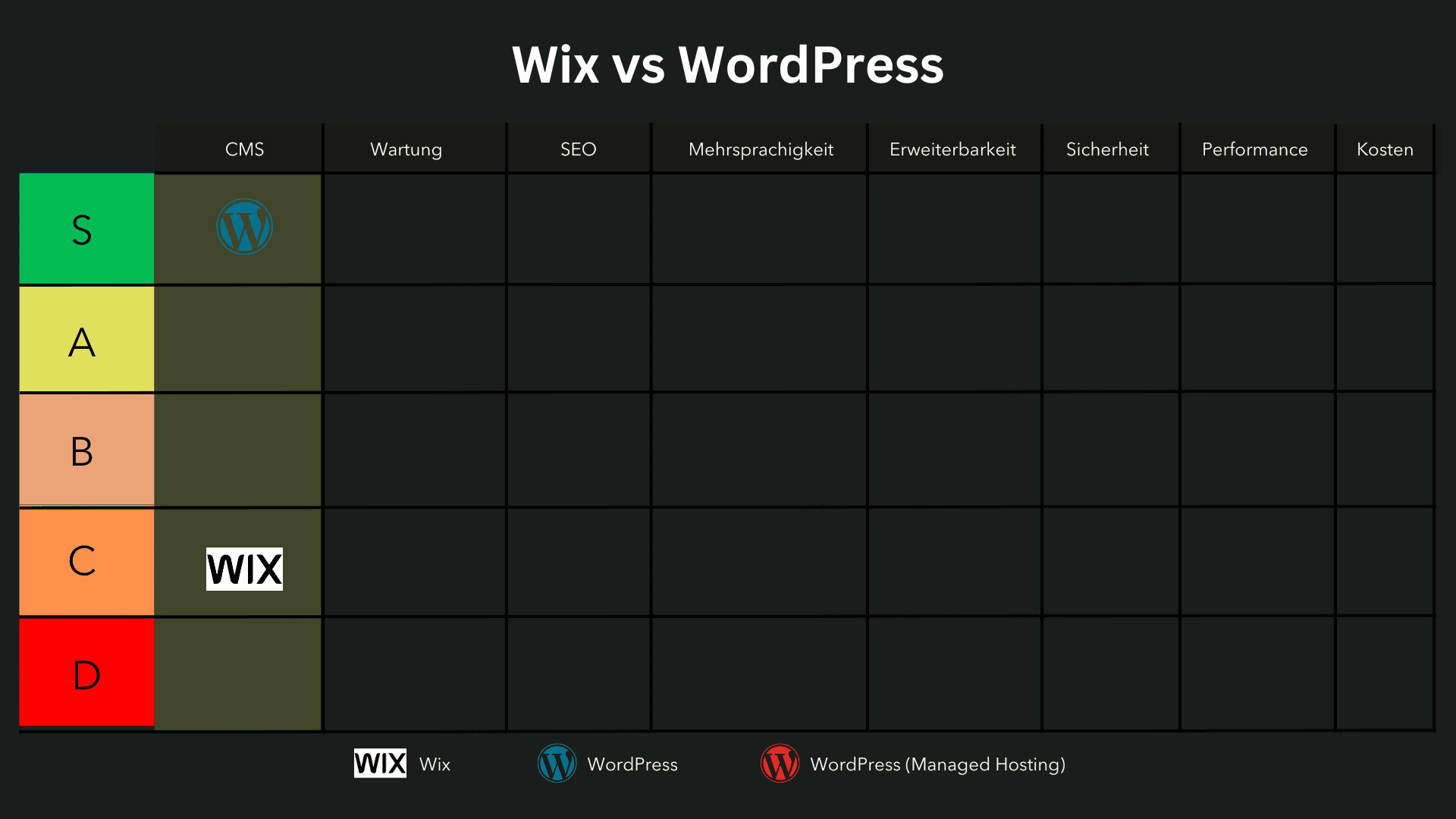
Einteilung:
- Wix: C-Tier
- WordPress: S-Tier
Wartung
Wix übernimmt die gesamte Wartung und Pflege automatisch, sodass Nutzer sich nicht um Updates, Sicherheitsmassnahmen oder Servereinstellungen kümmern müssen.
Alle Funktionen, einschliesslich Hosting, Sicherheitsupdates und Software-Aktualisierungen, werden direkt von Wix verwaltet, wodurch der Wartungsaufwand für den Nutzer praktisch nicht vorhanden ist.
Im Gegensatz zu WordPress oder anderen Open-Source-CMS gibt es bei Wix keine Notwendigkeit, Plugins oder Themes manuell zu aktualisieren.
Das System bleibt stets auf dem neuesten Stand, ohne dass der Nutzer eingreifen muss.
Dadurch werden mögliche Kompatibilitätsprobleme oder Sicherheitslücken, die durch veraltete Software entstehen könnten, automatisch vermieden.
Diese „All-in-One“-Lösung macht Wix besonders attraktiv für Nutzer, die sich nicht mit technischen Aspekten der Website-Wartung beschäftigen möchten.
Allerdings bedeutet diese Abhängigkeit von Wix auch, dass es keine Möglichkeit gibt, individuelle Servereinstellungen vorzunehmen oder selbst über Updates zu entscheiden
Wer volle Kontrolle über seine Wartungsstrategie haben möchte, wird mit Wix schnell an Grenzen stossen.
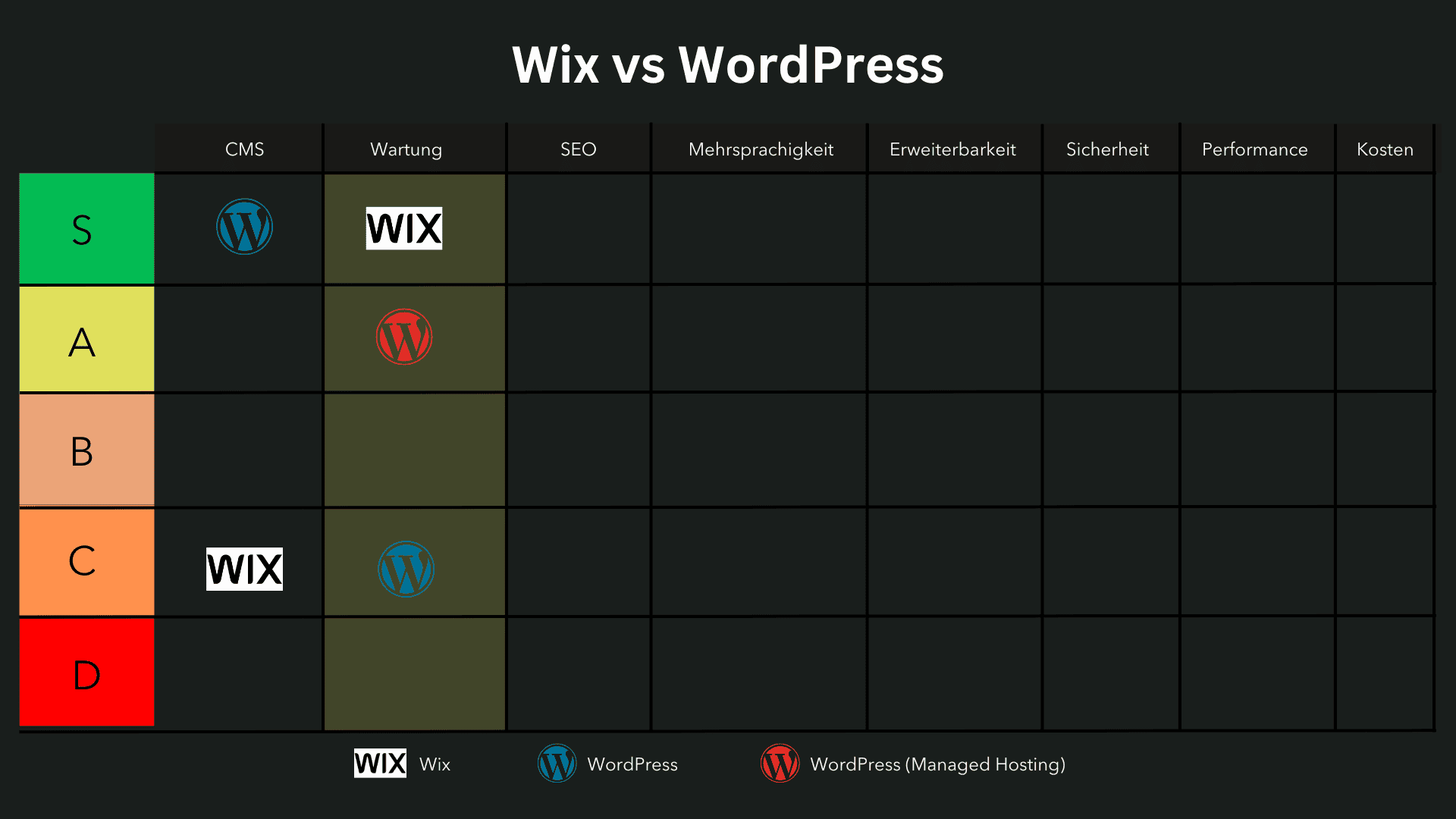
Einteilung:
- Wix: S-Tier
- WordPress (Managed Hosting): A-Tier
- WordPress: C-Tier
SEO
In puncto SEO hat WordPress die Nase vorn.
Wix bietet grundlegende SEO-Funktionen, ist aber im Vergleich zu WordPress deutlich eingeschränkter.
Nutzer können Meta-Titel, Meta-Beschreibungen und Alt-Tags für Bilder anpassen, jedoch fehlen erweiterte Funktionen wie eine vollständige Kontrolle über strukturierte Daten oder individuelle Anpassungen der URL-Struktur.
Ein Nachteil von Wix ist auch die eingeschränkte Flexibilität bei der technischen SEO
Während WordPress mit Plugins wie RankMath oder Yoast SEO detaillierte Steuerungsmöglichkeiten für Canonical-Tags, Schema-Markup und Weiterleitungen bietet, müssen Wix-Nutzer oft auf externe Tools zurückgreifen.
Vor allem bei umfangreichen SEO-Strategien kann das eine Herausforderung sein.
Auch die Performance-Optimierung ist bei Wix weniger flexibel.
Während WordPress durch Hosting-Anbieter wie Kinsta oder durch Caching-Plugins gezielt optimiert werden kann, ist man bei Wix auf die von der Plattform bereitgestellten Performance-Einstellungen angewiesen.
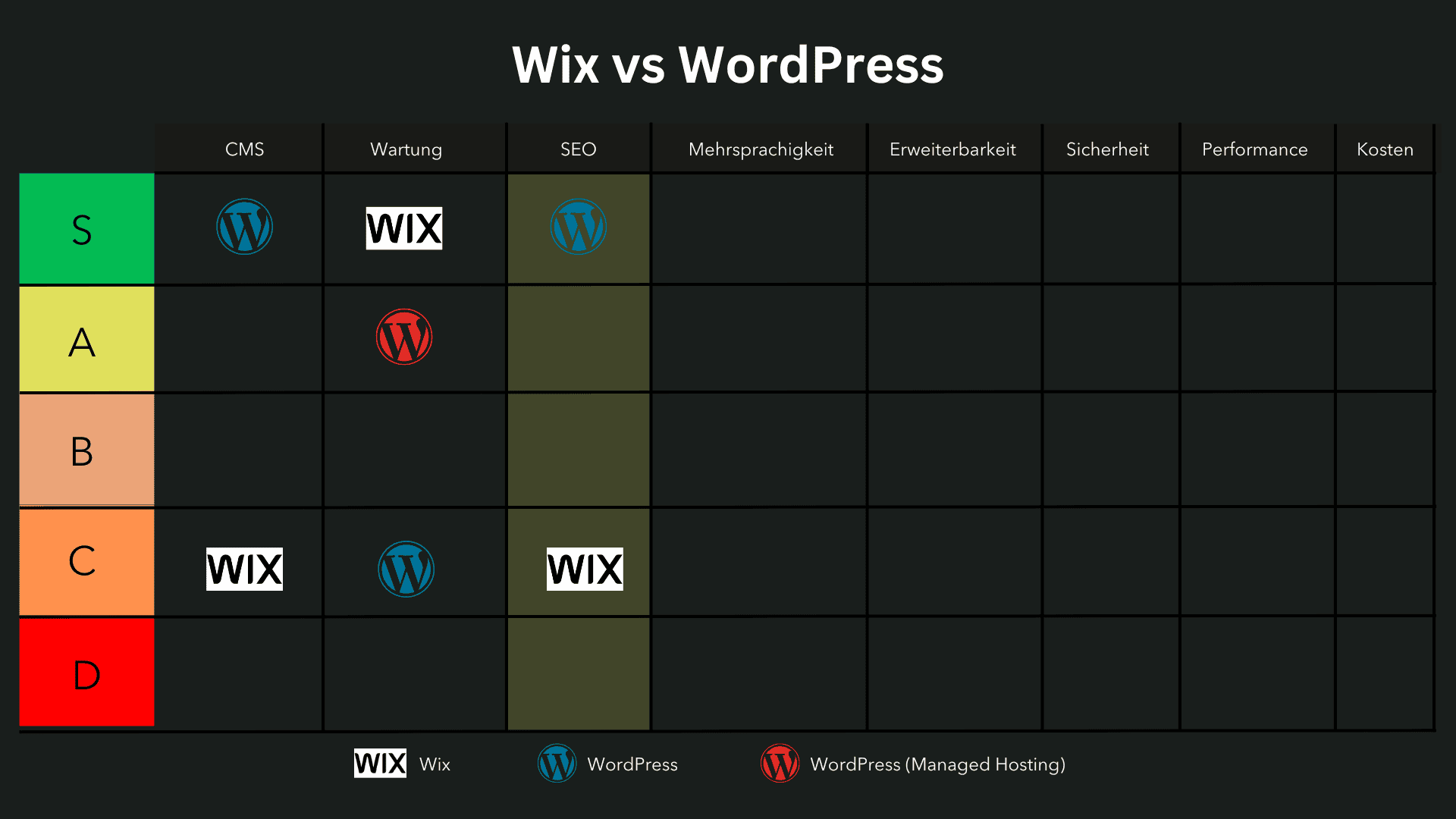
Einteilung:
- Wix: C-Tier
- WordPress: S-Tier
Mehrsprachigkeit
Wix bietet eine grundlegende Mehrsprachigkeitsfunktion, die es ermöglicht, Inhalte in mehreren Sprachen bereitzustellen
Allerdings bleibt sie in Bezug auf Flexibilität und SEO-Optimierung hinter WordPress zurück.
Während sich bei WordPress mit WPML oder Polylang eine vollwertige, professionelle mehrsprachige Website aufbauen lässt, gibt es bei Wix einige Einschränkungen.
Ein grosses Problem ist die fehlende vollständige Kontrolle über die URL-Struktur mehrsprachiger Seiten.
Während WordPress klare hreflang-Tags und individuelle Permalink-Strukturen für jede Sprache ermöglicht, arbeitet Wix mit einer eher starren Lösung, die weniger Kontrolle bietet.
Das kann sich negativ auf die Suchmaschinenoptimierung auswirken.
Zudem gibt es bei Wix keine Möglichkeit, sprachspezifische SEO-Elemente wie Meta-Titel und Beschreibungen pro Sprache individuell zu definieren, was für eine mehrsprachige SEO-Strategie sehr wichtig ist
Für kleinere Websites mit wenigen Seiten kann die Wix-Mehrsprachigkeitsfunktion ausreichen, für komplexere Websites mit mehreren Sprachversionen ist sie jedoch schnell unpraktisch und unflexibel.
Einteilung:
- Wix: B-Tier
- WordPress: A-Tier
Erweiterbarkeit
Wix bietet eine begrenzte Auswahl an Erweiterungen über seinen hauseigenen App-Markt, der verschiedene Zusatzfunktionen wie Buchungssysteme, Marketing-Tools oder Mitgliederbereiche bereitstellt
Im Vergleich zu WordPress ist die Erweiterbarkeit jedoch stark eingeschränkt, da Nutzer auf die von Wix bereitgestellten Apps angewiesen sind und keine eigene Software oder individuelle Anpassungen vornehmen können.
Ein grosser Nachteil ist, dass viele erweiterte Funktionen nur über kostenpflichtige Premium-Apps verfügbar sind.
Während WordPress mit über 60.000 kostenlosen und kostenpflichtigen Plugins nahezu unbegrenzte Anpassungsmöglichkeiten bietet, sind Nutzer bei Wix auf das beschränkte App-Ökosystem angewiesen.
Besonders für Unternehmen, die individuelle Funktionen benötigen, stösst Wix schnell an seine Grenzen.
Zudem ist die API-Integration in Wix stark eingeschränkt.
Während WordPress nahezu jede externe Anwendung und jedes Tool über eigene Schnittstellen anbinden kann, ist das bei Wix nur begrenzt möglich.
Das macht es schwieriger, Wix für grössere, komplexe Webprojekte zu nutzen, die individuell angepasste Funktionen benötigen.
Einteilung:
- Wix: D-Tier
- WordPress: S-Tier
Sicherheit
Wix ist eine geschlossene, proprietäre Plattform
Das bedeutet, dass Sicherheit und Wartung vollständig vom Anbieter übernommen werden
Da es keine Möglichkeit gibt, den Quellcode zu verändern oder eigene Plugins zu installieren, sind Hackerangriffe auf Wix-Websites selten, da die Angriffsfläche im Vergleich zu Open-Source-Systemen wie WordPress geringer ist.
Alle Wix-Websites sind standardmässig mit SSL-Verschlüsselung, DDoS-Schutz und automatischen Sicherheitsupdates ausgestattet.
Da die Nutzer keine eigene Serververwaltung oder Plugin-Updates durchführen müssen, besteht kein Risiko, dass durch unsichere Plugins oder veraltete Software Sicherheitslücken entstehen – ein Problem, das bei WordPress häufiger vorkommt, wenn es nicht regelmässig gewartet wird.
WordPress hingegen ist aufgrund seiner weiten Verbreitung ein häufiges Ziel von Hackerangriffen.
Webseiten, die nicht aktiv gesichert und gewartet werden, können anfälliger für Malware, Brute-Force-Angriffe und andere Sicherheitsrisiken sein.
Durch Managed Hosting bei Anbietern wie Kinsta oder WP Engine lässt sich die Sicherheit jedoch deutlich verbessern, da diese Hosting-Anbieter automatische Sicherheitsmassnahmen, regelmässige Updates und Firewalls integrieren.
Insgesamt bietet Wix die sicherere Lösung für Nutzer, die sich nicht selbst um Sicherheitsmassnahmen kümmern wollen.
WordPress ist mit der richtigen Konfiguration aber auch sicher.
Einteilung:
- Wix: S-Tier
- WordPress (Managed Hosting): A-Tier
- WordPress: C-Tier
Performance
Wix bietet eine solide Performance mit integriertem Hosting auf einer Cloud-Infrastruktur.
Alle Wix-Websites werden automatisch auf einem globalen Content Delivery Network (CDN) gehostet, was schnelle Ladezeiten gewährleistet.
Da es sich um eine geschlossene Plattform handelt, sind Optimierungen bereits standardmässig integriert, ohne dass sich der Nutzer um technische Einstellungen kümmern muss.
Allerdings gibt es Einschränkungen:
Wix nutzt Shared Hosting, was bedeutet, dass deine Website Ressourcen mit anderen Nutzern teilt.
Während das für kleine bis mittelgrosse Websites ausreichend ist, kann es bei höherem Traffic zu Ladezeitproblemen kommen.
Zudem gibt es bei Wix keine erweiterten Möglichkeiten zur serverseitigen Optimierung, wie sie bei WordPress mit Managed Hosting oder speziellen Caching-Plugins möglich sind.
WordPress kann je nach Hosting-Anbieter und Konfiguration entweder sehr schnell oder langsam sein.
Standard-Webhosting mit Shared Servern kann Performance-Probleme verursachen, insbesondere wenn viele Plugins und komplexe Themes genutzt werden.
Durch Managed Hosting bei Anbietern wie Kinsta oder Cloudways lässt sich die Performance jedoch auf ein extrem hohes Niveau heben – vergleichbar oder sogar besser als bei Wix.
Während Wix für einfache Websites eine solide Performance bietet, bleibt es hinter WordPress mit optimiertem Hosting zurück.
Wer eine hochperformante, skalierbare Website betreiben möchte, fährt mit Managed WordPress Hosting langfristig besser
Einteilung:
- Wix: A-Tier
- WordPress (Managed Hosting): S-Tier
- WordPress: B-Tier
Kosten
Wix folgt einem Abo-Modell, bei dem Nutzer monatlich oder jährlich für verschiedene Tarife zahlen.
Alle Tarife beinhalten Hosting, Sicherheitsupdates und grundlegende Funktionen, sodass keine zusätzlichen Kosten für externe Hosting-Anbieter oder Wartung anfallen.
Das macht die Kostenstruktur vorhersehbar und einfach zu kalkulieren, besonders für Einsteiger oder kleine Unternehmen
Allerdings gibt es Einschränkungen
Erweiterte Funktionen, zusätzliche Speicherplatzoptionen oder E-Commerce-Features sind oft nur in teureren Plänen verfügbar.
Zudem sind individuelle Anpassungen oder Skalierungsmöglichkeiten begrenzt, sodass Nutzer auf die von Wix angebotenen Tarife angewiesen sind.
WordPress hingegen kann flexibler an individuelle Budgets angepasst werden
Während das CMS selbst kostenlos ist, hängen die tatsächlichen Kosten von verschiedenen Faktoren ab – etwa Hosting, Premium-Themes, Plugins oder Wartungsaufwand.
Managed Hosting bei Anbietern wie Kinsta kann die Kosten erhöhen, bietet aber gleichzeitig deutlich mehr Leistung und Flexibilität.
Für kleine Websites oder einfache Online-Präsenzen ist Wix die günstigere und unkompliziertere Lösung, da alle Funktionen in einem einzigen Plan enthalten sind.
WordPress kann günstiger oder teurer sein, je nach Anforderungen und gewählten Erweiterungen.
Einteilung:
- Wix: S-Tier
- WordPress: B-Tier
Zwischenfazit
Beide Plattformen haben ihre Stärken und Schwächen.
Wix überzeugt mit einfacher Bedienung, automatisierter Wartung und einer All-in-One-Lösung, während WordPress durch maximale Flexibilität, Erweiterbarkeit und bessere SEO-Funktionen punktet
Empfehlungen für Nutzergruppen:
- Unternehmen: Wix eignet sich für kleine Unternehmen, die schnell eine ansprechende Website erstellen möchten, ohne sich um Hosting oder Wartung kümmern zu müssen. WordPress ist besser für Unternehmen, die eine skalierbare und individuell anpassbare Lösung benötigen.
- Einzelpersonen/Blogger: WordPress bietet bessere SEO- und Blogging-Funktionen, während Wix für einfache Blogs ausreichend ist, aber weniger Anpassungsmöglichkeiten bietet.
- Einsteiger: Wix ist ideal für alle, die keine technischen Vorkenntnisse haben und sofort mit einer fertigen Lösung starten möchten. WordPress hat eine steilere Lernkurve, bietet langfristig aber mehr Möglichkeiten.
- Entwickler: WordPress ist die bessere Wahl für individuelle Webprojekte und erweiterte Funktionen. Wix ist eher für Nutzer geeignet, die ohne Coding-Kenntnisse arbeiten möchten.
Persönliche Empfehlung:
Wix ist eine gute Wahl für alle, die eine einfache, wartungsfreie Lösung bevorzugen.
Wer jedoch langfristig eine skalierbare, SEO-optimierte und individuell anpassbare Website benötigt, wird mit WordPress deutlich mehr Möglichkeiten haben.
Wann solltest du Wix und wann WordPress wählen?
Wix ist die beste Wahl, wenn du eine einfache Website ohne technisches Vorwissen erstellen möchtest.
Es eignet sich für kleine Unternehmen, Freelancer und Selbstständige, die eine ansprechende Online-Präsenz benötigen, ohne sich mit Hosting, Updates oder Plugins auseinandersetzen zu müssen.
Besonders für Portfolio-Seiten, Blogs und kleine Online-Shops ist Wix eine schnelle Lösung.
Wenn du Wert auf eine einfache Bedienung legst und keine tiefgehenden Anpassungen benötigst, ist Wix ideal.
WordPress ist die bessere Wahl, wenn du eine skalierbare und individuell anpassbare Website benötigst.
Es eignet sich für Unternehmen, grosse E-Commerce-Projekte, Blogs mit vielen Inhalten und komplexe Websites.
WordPress bietet maximale Design-Flexibilität, SEO-Optimierung und Erweiterungsmöglichkeiten.
Wenn du langfristig wachsen willst und vollständige Kontrolle über deine Website haben möchtest, solltest du WordPress wählen.
Besonders für Online-Shops mit WooCommerce, contentreiche Websites und Webseiten mit speziellen Funktionen ist WordPress die leistungsfähigere Lösung
Ist Wix wirklich zu limitiert?
Ist WordPress wirklich kompliziert?
Viele glauben, dass Wix nur für einfache Websites geeignet ist und WordPress für Profis gemacht wurde.
Doch diese Annahmen sind nicht ganz richtig.
Wix hat sich in den letzten Jahren stark weiterentwickelt und bietet mittlerweile leistungsstarke E-Commerce-Funktionen, SEO-Tools und Design-Flexibilität.
Für viele kleine Unternehmen reicht das völlig aus.
Wer jedoch tiefgehende Anpassungen oder komplexe Funktionen benötigt, stösst schnell an Grenzen.
Skalierbarkeit bleibt eine Herausforderung, da grössere Websites mit vielen Unterseiten und individuellen Anforderungen oft schwer umsetzbar sind.
WordPress wird oft als zu kompliziert angesehen.
Tatsächlich kann der Einstieg anspruchsvoller sein, da du Hosting, Themes und Plugins selbst verwalten musst.
Doch mit den richtigen Tools und etwas Einarbeitung kannst du WordPress genau an deine Bedürfnisse anpassen.
Die Skalierbarkeit, Individualisierbarkeit und SEO-Power sind unübertroffen.
Wer bereit ist, sich mit der Plattform auseinanderzusetzen, erhält maximale Kontrolle und Wachstumsmöglichkeiten.
Der grösste Unterschied liegt also in den Anforderungen.
Wix ist ideal für eine schnelle, unkomplizierte Website, während WordPress langfristig mehr Möglichkeiten bietet, aber auch mehr Verantwortung mit sich bringt.
Fazit – Welche Plattform passt zu dir?
Die Entscheidung zwischen Wix vs. WordPress hängt von deinen Anforderungen, deinem Budget und deinem technischen Know-how ab.
Beide Systeme haben ihre Stärken und Schwächen, doch welche Plattform für dein Website-Projekt die beste ist, hängt von deinen individuellen Bedürfnissen ab.
Wenn du eine schnelle Lösung suchst, mit einer Drag-and-Drop-Oberfläche arbeiten willst und keine technischen Vorkenntnisse hast, ist Wix der richtige Website-Baukasten.
Die Plattform bietet eine einfache Website-Erstellung, vordefinierte Templates und ein integriertes Hosting.
Allerdings bist du in der Flexibilität eingeschränkt, und komplexe E-Commerce-Funktionen oder SEO-Anpassungen sind nur begrenzt möglich.
Möchtest du eine leistungsstarke Plattform, die maximale Individualisierung erlaubt, ist WordPress.org die bessere Wahl.
Mit der richtigen Kombination aus Themes, Plugins und Hosting kannst du eine vollständig skalierbare Webseite erstellen – egal ob Blog, Unternehmensseite oder Online-Shop.
Allerdings benötigst du etwas mehr Know-how und musst dich um regelmässige Updates, Sicherheit und Wartung kümmern.
Die richtige Wahl hängt davon ab, wie viel Kontrolle du haben möchtest:
- Wix ist perfekt für Anfänger, die eine schöne Website ohne technisches Wissen erstellen wollen.
- WordPress bietet dir die volle Kontrolle über dein Website-Projekt, ist jedoch komplexer und erfordert mehr technisches Verständnis.
Wenn du planst, deine Website langfristig zu betreiben und professionell zu skalieren, bietet WordPress.org die besseren Möglichkeiten.
Wix hingegen bleibt eine solide Wahl für kleine Unternehmen, Freelancer oder persönliche Projekte, die eine schnelle und unkomplizierte Lösung suchen.
Am Ende kommt es auf deine Ziele, dein Budget und deine Bereitschaft zur Einarbeitung an.
Wenn du noch unsicher bist, teste beide Systeme und entscheide dich für die Plattform, die am besten zu deinem Projekt passt.